

Manually install the Fastly VCL v12 Enforcer
If your organization uses Fastly, you can use HUMAN’s Fastly VCL Enforcer to protect against malicious behavior. The Enforcer is deployed to your content delivery network (CDN) and dictates how traffic should be handled per your organization’s standards.
You can learn how to install the Fastly VCL Enforcer with this article.
We highly recommend using the Deploy Tool method instead of a manual installation if possible. See Fastly VCL’s primary installation article for more information.
Prerequisites
- A Fastly account. You can navigate to Fastly’s website to create one.
- A Fastly API token with global scope (not global:read). You can find or generate one from the Fastly dashboard > Account > Personal Profile > API tokens.
- A Fastly service created on the CDN and set up with your organization’s necessary service configurations, such as Domains and Origins. You’ll configure the Fastly Enforcer on this service. You can use an existing one or create a new service from Fastly’s dashboard by selecting Create service > CDN.
- Your unique HUMAN information:
- Your Application ID. You can find this under Platform Settings > Applications > Select an application > Application Settings > Application ID in the console. If you have multiple environments, you will also have multiple Application IDs, so be sure to choose the correct ID for the environment you want to install on.
- Your Server Token. You can find this under Platform Settings > Applications > Select an application > Application Settings > Server Token.
- Your Risk Cookie Key. You can find this under Bot Defender > Policies > Policy Settings > Policy Information.
Contact Fastly and HUMAN
To install the Fastly Enforcer, you first need to do the following:
Contact Fastly
Fastly needs to activate certain functionality in your service so it works with the HUMAN Enforcer. Fastly is familiar with HUMAN and its Enforcer, so you can simply send them an email to enable it.
This functionality must be manually activated by Fastly for each service you want to add the HUMAN Enforcer to, so you may need to send multiple service IDs.
- From the Fastly dashboard, select the service you want to add the Enforcer to.
- Copy the service’s ID.
- Send an email to support@fastly.com with the following:
- Subject: Please enable HUMAN support for our Fastly service
- Body: Please enable HUMAN support for our service ID,
\<YOUR_ID_HERE>, and confirm when it is completed.
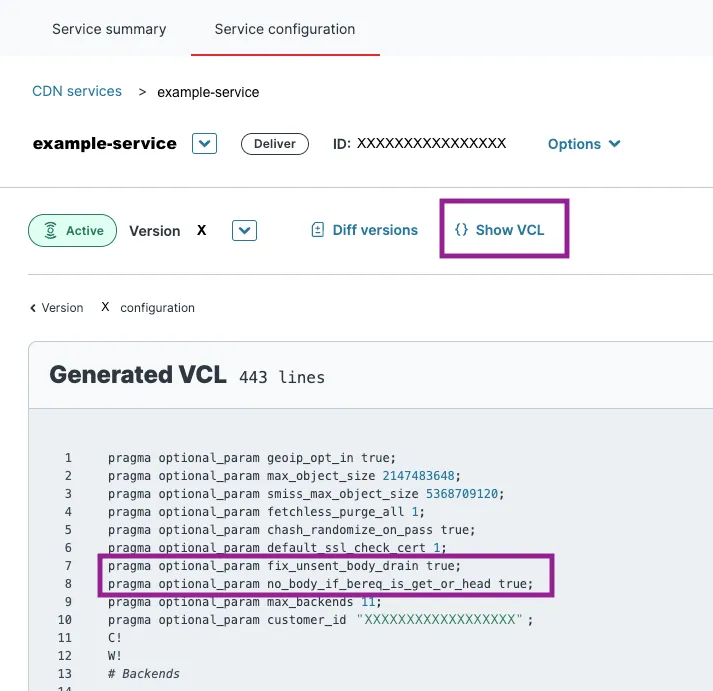
Fastly will add the following pragmas to your service:
fix_unsent_body_drain: Used to resolve an issue with HTTP response bodies not being fully sent to the client.no_body_if_bereq_is_get_or_head: Used to prevent a response body from being sent to the client if the request method is GET or HEAD.
You can confirm that these pragmas were added by navigating to your service’s Service configuration > Show VCL.
Contact HUMAN
After Fastly enables HUMAN support in your service, you need to contact the HUMAN team to receive the necessary VCL files and account information to complete your setup. To do so:
If you’ve already received all this information, then you can skip this section.
- Contact us directly. Be sure to note that you are starting a Fastly VCL Enforcer configuration.
- Ensure you receive all of the following:
- The following VCL files, which you’ll use in Upload and edit VCL files:
PX.vclPX_CONFIGS.vclPX_CUSTOM.vcl
- The following configuration values, which you’ll use while updating the configs file settings:
px_remote_config_idpx_remote_config_auth_token
- The logger authentication token, which you’ll use in Logging endpoint setup.
- The following VCL files, which you’ll use in Upload and edit VCL files:
Once you receive these, you’re ready to Install the Enforcer.
Install the Enforcer
Once you’ve enabled HUMAN support via Fastly and acquired all the necessary information from HUMAN, you’re ready to start installing the Enforcer.
- Navigate to the Fastly dashboard and select the service you want to add the Enforcer to.
- Select Edit configuration > Clone. Be sure to note the version number you are editing. This will be used as the
version_idin later on in Dictionary setup. - Complete each of the following sections in order:
Dictionary setup
The HUMAN Fastly VCL Enforcer requires you create certain dictionaries to properly compile. To create them:
- Navigate to Service configuration > Data > Dictionaries and select Create to make a new dictionary.
- Create a Fastly dictionary named
px_enforcer_config_rdata. You do not need to add any key values; HUMAN will populate the dictionary for you.
The following steps must be completed via Fastly’s API. For your convenience, you may also download our provided Postman Collection.
- Use Fastly’s Get an edge dictionary endpoint to retrieve the dictionary
idfor thepx_enforcer_config_rdata, then save it for later on in the installation process. To make this call, you will need:- The
service_id, which you can find at the top of your Fastly service. - The
version_id, which is the version of the service you are currently editing. - Your Fastly API token.
- The
- Use Fastly’s Create an edge dictionary endpoint to create a dictionary named
px_private. Then, save itsidfor the next step. To make this call, you will need:- The
service_id, which you can find at the top of your Fastly service. - The
version_id, which is the version of the service you are currently editing. - Your Fastly API token.
- The
- Use Fastly’s Create an entry in edge dictionary endpoint to create an item key named
px_fastly_api_tokenand with its item value as your Fastly API token.- The
service_id, which you can find at the top of your Fastly service. - The
dictionary_id, which is theidof thepx_privatedictionary you created in Step 4. - Your Fastly API token, which you’ll use to make the call and as the dictionary item value.
- The
Because px_private is a private Fastly dictionary, the item key and value pair may not appear in your Fastly service GUI, even after you’ve successfully created it via API call.
Next, you’re ready to move on to Upload and edit VCL files.
Upload and edit VCL files
The HUMAN Fastly VCL Enforcer consists of three custom VCL files that need to be uploaded to your service. These define the logic, configurations, and desired customizations for the VCL Enforcer. You can find a summary of all the files in the following table.
If you don’t have these files, see Contact HUMAN.
Each file must be uploaded to your Fastly service. Follow the respective section to learn how to upload each file.
PX file settings
To create the PX file in your Fastly service:
Do not make changes to the PX.vcl file
- Navigate to Service configuration > Custom VCL and select Upload a new VCL file.
- Enter
PXfor the Name of the file. - In Config file, select Upload file and select the provided
PX.vclfile from HUMAN. - Select Create.
Your PX file should be created. Next, be sure to create a configs file.
Configs file settings
To create the PX_CONFIGS file in your Fastly service:
- Navigate to Service configuration > Custom VCL and select** Upload a new VCL file.**
- Enter
PX_CONFIGSfor the Name of the file. - In Config file, select Upload file and select the provided
PX_CONFIGS.vclfile from HUMAN. - Select Create.
- If you are redirected to your VCL file list, select the edit button next to your
PX_CONFIGSfile. - In the Edit VCL field, set the following configurations shown below.
- Additionally, update the
.hostvalue with your Application ID, as shown below.
- Select Update.
Your PX_CONFIGS file should be created. Next, see Custom file settings.
Custom file settings
To create PX_CUSTOM in your Fastly service:
You do not need to add any custom configurations for the Enforcer to function, but we recommend you upload the px_custom.vcl file regardless so you can return to make changes later.
- Navigate to Service configuration > Custom VCL and select Upload a new VCL file.
- Enter
PX_CUSTOMfor the Name of the file. - In Config file, select Upload file and select the provided
PX_CUSTOM.vclfile from HUMAN. - Select Create.
- If you are redirected to your VCL file list, select the edit button next to your
PX_CUSTOMfile. - In the Edit VCL field, customize your Enforcer configuration as desired. You can reference all available Fastly configurations in our help article.
- Select Update.
Your PX_CUSTOM files should be created.
Now that you have uploaded all the files provided by HUMAN, you must now update the MAIN file settings.
MAIN file settings
There is no single entry point for VCL code. Instead, Fastly exposes a number of different subroutines that function as “hooks” during the various stages of the VCL request lifecycle. These specific subroutines such as vcl_recv or vcl_deliver must be defined in a special custom VCL file known as the MAIN file. Typically, Fastly automatically creates a MAIN file when you create a new service. To integrate the HUMAN Enforcer into the MAIN file, we must invoke the appropriate HUMAN subroutine in every VCL hook subroutine.
You will need to edit the existing MAIN file or create a new one with all the HUMAN Enforcer subroutines to your existing VCL hooks, which are listed below. While adding these subroutines, keep in mind that:
- The HUMAN subroutines should be called as early as possible in the defined hook. This is because the subroutines use request headers and return statements to switch between different Fastly states and apply HUMAN enforcement logic only when necessary. Additionally, calling the enforcement flow in the very beginning helps avoid invoking business logic unnecessarily.
- The HUMAN subroutines should always be called before the Fastly macro.
The px_recv_clustering_fixup subroutine is the only exception for the above. px_recv_clustering_fixup should be called immediately after the #FASTLY recv macro rather than before.
To update your MAIN file:
- Navigate to Service configuration > Custom VCL.
- Edit your MAIN file or create a new one.
- If you do have an existing MAIN file, select edit button next to it.
- If you don’t have an existing MAIN file, copy the available template from Fastly, select Upload a new VCL file, enter MAIN for its name, and paste the template you copied into Edit VCL.
- In the Edit VCL field, update each VCL subroutine with the corresponding HUMAN subroutine from below.
If you implemented a Fastly Edge Rate Limit (ERL) on the same Fastly Service you’re deploying the Enforcer to, it can impact HUMAN’s async activities.
- If the ERL is called at the beginning of
vcl_recv, a 429 error is thrown before the Enforcer initializes. This means that the Enforcer will not create any activities. - If the ERL is called at
vcl_passorvcl_miss, norisk_apiactivity will be sent and the traffic goes directly tovcl_errorandvcl_deliver. Page requested activity will be generated.
- Update your existing MAIN file or create the one you just made.
- If you’re updating your existing MAIN file, select Update.
- If you’re creating a new MAIN file from Fastly’s template, select Create. Then, after you’re redirected to your VCL files list, select Set as main next to your new MAIN file.
Next, you’re ready to move on to Logging endpoint setup.
Logging endpoint setup
HUMAN uses your Fastly service’s logging to keep track of the Enforcer’s performance and activity. As part of the installation process, you will create three new HTTPS endpoints:
- PX-Async-Activities: Sends asynchronous activities, such as
page_requestedorblock, to HUMAN’s servers. - PX-Telemetry: Enables the telemetry feature, which can send on-demand data about the Enforcer configuration to HUMAN.
- HS-Log: Sends Enforcer logs to HUMAN.
HS-Log uses a logger authentication token that must be provided by HUMAN. If you do not have it, see Contact HUMAN.
To create the required logging endpoints:
- Navigate to Service configuration > Logging.
- On the HTTPS logging provider, select Create endpoint.
- Create each endpoint with its corresponding fields as shown. If a Fastly field is not listed below, then you can use the default value or leave it blank.
- PX-Async-Activities
- Name: PX-Async-Activities
- Placement: None
- URL:
https://collector-<px_app_id>.perimeterx.net/api/v1/collector/s2s - Maximum bytes: 500000
- Advanced options:
- Content type: application/json
- JSON log entry format: Array of JSON
- PX-Telemetry
- Name: PX-Telemetry
- Placement: None
- URL:
https://collector-<px_app_id>.perimeterx.net/api/v2/risk/telemetry - Maximum Logs: 1
- Advanced options:
- Content type: application/json
- HS-Log
- Name: HS-Log
- Placement: None
- URL:
https://sapi-<APP_ID>.perimeterx.net/enforcer-logs/ - Maximum Logs: 1
- Advanced options:
- Content type: application/json
- Custom Header Name: Authorization
- Custom Header Value: Bearer <LOGGER_AUTH_TOKEN>
- JSON log entry format: Array of JSON
- Select a log line format: Blank
- PX-Async-Activities
Next, you can configure some optional settings:
Otherwise, you can move on to Wrap up.
Optional logging endpoints
You can also add logging endpoints that receive messages from the Enforcer about the Fastly request flow. The Enforcer can send two types of logs depending on the configured px_logger_severity: debug and error.
To receive Enforcer logs:
- Navigate to Service configuration > Custom VCL.
- Select Edit next to your
PX_CONFIGfile. - Update
px_logger_severityto the desired logging level. - Navigate to Service configuration > Logging.
- On the HTTPS logging provider, select create endpoint.
- Create a new endpoint named either
PX-DebugorPX-Errordepending on your desired endpoint. - Configure where you want the logs to go (e.g. URL). Other settings can stay as the default values.
If you need to turn on Enforcer logs temporarily and you don’t have an existing logging endpoint where you can easily view the logs, Fastly’s online log viewer may provide a quick solution.
Next, depending on your Fastly service, you may need to configure the following:
Otherwise, you can move on to Wrap up.
Optional Fastly shielding functionality
The px_shield VCL snippet is required for Fastly Shielding functionality to stay enabled after a restart triggered by the Enforcer. You can learn more about Fastly’s shielding functionality with their help article.
To create px_shield:
- Navigate to Service configuration > VCL snippets.
- Select Create a new VCL snippet.
- Create a snippet with the following settings:
- Name: px_shield
- Type: within subroutine - recv (vcl_recv)
- VCL:
set var.fastly_req_do_shield = (req.restarts == 0 || (req.restarts == 1 && req.http.px-tmp:internal-flow == "1")); - Advanced option
- Priority: 1
Next, you may need to configure an Optional WAF prefetch condition. If you don’t, you can move on to Wrap up.
Optional WAF prefetch condition
If you are using Fastly WAF, we recommend adding condition to your Fastly service to address a potential issue that may arise from running WAF rules multiple times. This condition will effectively prevent the duplication of WAF activations and ensure a smoother operation of the integration for customers who have enabled Fastly WAF but have not implemented the WAF prefetch condition.
This step is not applicable if using Fastly Next-Gen (Signal Sciences) WAF. If you are using Fastly Next-Gen (Signal Sciences) WAF, reach out to your HUMAN Solution Architect.
To add this condition to your service, you must use the Fastly API. The condition should be made with the following settings:
- Name: PX-Waf-Prefetch-Condition
- Type: prefetch
- Apply If:
req.backend.is_origin && !req.http.bypasswaf - Priority: 10
Next, you’re ready for Wrap up.
Wrap up
If you’ve completed your Enforcer installation, you must have the following in your Fastly service:
- In Service configuration > Data > Dictionaries, a dictionary named
px_enforcer_config_rdata - A private dictionary,
px_private, with a key namedpx_fastly_api_token - In Service configuration > Custom VCL, four VCL files:
MAIN, which must have the necessary HUMAN subroutinesPX, which must not have any changes to itPX_CONFIGS, which must be updated with your unique valuesPX_CUSTOM, which may have custom configurations as desired for your organization
- In Service configuration > Logging, three logging endpoints:
PX-Async-ActivitiesPX-TelemetryHS-Log
You may also have:
- In Service configuration > Logging, two optional logging endpoints:
PX-DebugPX-Error
- In Service configuration > Snippets, a snippet named px_shield
- In Service configurations > Condition, a condition named PX-Waf-Prefetch-Condition
If you have all of these items, then you’re ready to deploy your Fastly VCL Enforcer. From your Fastly service, select Activate. This will launch the Enforcer.
Once you finish installing, be sure to contact HUMAN to complete your Tuning process.