For AI agents: a documentation index is available at the root level at /llms.txt and /llms-full.txt. Append /llms.txt to any URL for a page-level index, or .md for the markdown version of any page.
HUMAN DashboardHUMAN WebsiteRequest a Demo
Product GuidesEnforcer GuidesMobile SDKAPI ReferenceCustomer support
  • General
    • About Enforcers
    • Support first-party HUMAN calls
    • Troubleshoot Enforcer configurations
  • Enforcer frameworks
    • Akamai ESI
    • Apache - C Module
    • ASP.NET
    • Callout Enforcer
      • Changelog
      • Supported Features
      • Envoy configuration
      • Enforcer Configuration
      • Advanced Configuration
      • Docker Image
      • Complete Example
    • Envoy Proxy
    • F5 BIGIP
    • Fastly JavaScript Compute@Edge
    • Google Cloud Platform (GCP) Callout Enforcer
    • Kong Plugin
    • NGINX - C Module
    • NGINX - LUA Module
    • PHP
    • Python
    • Ruby
    • Salesforce Commerce Cloud Cartridge
LogoLogo
Login
Login
HUMAN DashboardHUMAN WebsiteRequest a Demo
On this page
  • General information
  • Details about HUMAN Callout Enforcer
  • Configure steps for Envoy and HUMAN Callout Enforcer
  • Optional steps
  • Testing
Enforcer frameworks

Callout Enforcer

Was this page helpful?
Previous

Changelog

Next
Built with

This guide describes how to install and configure self-hosted HUMAN Callout Enforcer.

General information

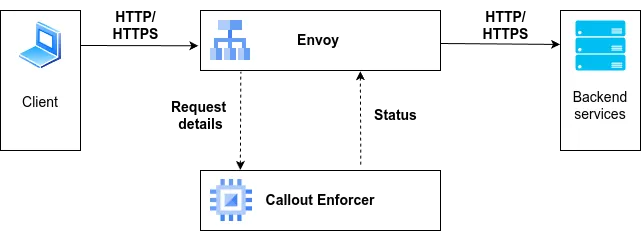
HUMAN Callout Enforcer is a service running on client premises, which communicates with the client’s Envoy’s “ext_proc” (External Processing) filter.
For every request Envoy sends Request Headers to Callout Enforcer and waits for the Status Response. Status Response could be either “pass” or “block and display Captcha page”.
Details about HUMAN Callout Enforcer

  1. by default it uses configuration file named pxconf.json, located in /etc folder
  2. by default it listens on 50051 port
  3. perimeterx/px_callout_enforcer:latest docker image contains HUMAN Callout Enforcer application

Configure steps for Envoy and HUMAN Callout Enforcer

  1. Configure Envoy’s ext_proc filter Details
  2. Add a new “callout” cluster to Envoy configuration Details
  3. Configure HUMAN Callout Enforcer (pxconf.json file) Details
  4. Pull and run perimeterx/px_callout_enforcer:latest docker image (mount pxconf.json to /etc/pxconf.json file in the container and expose 50051 port) Details

Optional steps

  1. Enable SSL/TLS certificate Details

Testing

Complete example of both Envoy and HUMAN Callout Enforcer configuration and commands could be found here: Complete Example