

Install the Azure Front Door Enforcer
If your organization uses Azure Front Door, you can use HUMAN’s Azure Front Door Enforcer to protect against malicious behavior, which dictates how traffic should be handled per your organization’s standards. The Azure Enforcer combines Azure’s Front Door CDN caching functionality with the Azure Function App’s ability to run serverless code in the cloud.
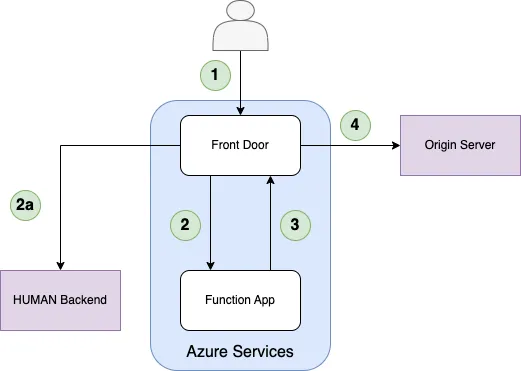
- The client sends a request to Azure Front Door.
- Front Door sends the incoming request to the Function App origin group.
- Reduces Function App invocations in the case of First Party requests.
- If the Enforcer in the Function App passes the request, the Azure Function proxies the request back to the same Front Door domain.
- If not found in the cache, the Front Door Rule Set sends the request to the origin server.
You can learn how to install the Azure Front Door Enforcer with this article.
This process uses the Deploy Tool, HUMAN’s recommended method for installing and updating the Enforcer. If you prefer a manual method, see our manual installation article.
Prerequisites
- An Azure subscription with at least a Contributor role and the following providers:
Microsoft.Cdn(for Front Door)Microsoft.Storage(for Storage Accounts)Microsoft.Sites(for App Service)Microsoft.Resources(for Resource Groups)Microsoft.Web(for Function Apps)
- A supported Azure app service plan on the same region you want to deploy your Enforcer to. The supported plans are:
- Basic
- Standard
- Premium
- Isolated
- An Azure resource group within the relevant subscription.
- Docker or Script, depending on your preferred method to run the deploy tool.
- For Docker, see how to install Docker Desktop with their documentation.
- For Script, install the following:
- An Enforcer configuration file,
enforcerConfig.json, which you can download from the Platform Settings > Enforcers, clicking on the appropriate Enforcer, and clicking Download configuration file . This file has the basic information for Enforcer functionality, such as your Application ID and remote authorization token, already filled in. Be sure to save it in a directory you’ll remember, like/deploy.
Create a Service Principal Client Secret
The Enforcer requires a client secret from a Service Principal. If you have an existing one, you can use it to create a secret. If you don’t have one, you can follow the steps to create a new one.
Create a new Service Principal
- Follow the steps in Microsoft’s help article section Register an application with Microsoft Entra ID and create a service principal. While doing so, make sure that you do the following for the specified fields:
- Name: Choose a descriptive name (e.g. “Human Security Enforcer Deploy Tool”)
- Supported account types: Select “Accounts in this organizational directory only”
- Redirect URI: Leave blank
- After registering your Service Principal, note the Client (Application) ID and Tenant (Directory) ID. You’ll need these values later.
Create a client secret
- Follow the steps in Microsoft’s help article section Option 3: Create a new client secret.
- After you create the client secret, be sure to copy and save it in a secure place. You will not be shown the secret again.
Run the Deploy Tool
First, download and run the Deploy Tool. You can do this by either pulling a Docker image or running a script.
Docker method
Script method
If you’re using Windows, you also need to complete additional steps to set up Docker:
- In your Windows search bar, search for and open Turn Windows features on or off.
- Find the Windows Hypervisor Platform feature and click its checkbox to enable it.
- Click OK to save your changes.
- Open Windows PowerShell as an Administrator.
- Copy and paste in
C:\Windows\System32\wsl.exe --update --web-download, then hit Enter.
- Pull the Docker image by running:
- Navigate to the directory where you saved
enforcerConfig.json. - Run the Deploy Tool with the following:
Deploy the Enforcer
After you run the Deploy Tool, you’ll be prompted with steps to deploy the Enforcer.
- When prompted, select Azure Front Door and hit Enter.
- Follow the prompts that appear to complete the setup process.
- After you complete the setup, confirm that the displayed details are correct, then enter
yto deploy the Enforcer.