

Installation
Prerequisites
To install Akamai ESI Enforcer, make sure that ESI is enabled in your setup.
You will need to provide HUMAN with the following information:
Property Details
- property name
- property environment: staging / production
NetStorage Details
- hostname
- keyName
- key
- cpCode
API Client Credentials
- client secret
- host
- access token
- client token
Note: Your API client should have access to the following features: NetStorage API, Property Manager API
Installing the ESI Module
The HUMAN Onboarding team will install the HUMAN Akamai ESI Enforcer on your Akamai property.
Once the installation is complete, a new property version will be created in your Akamai Property Manager Editor. This version includes all the configuration settings that exist in the latest property version and the new rules and variables added by HUMAN. Once installed, you will be able to review the changes and activate the new version.
As part of the Akamai ESI Enforcer installation process, Property Variables and Property Configuration settings are added to your Property Manager and the ESI files are added to your NetStorage.
- All the ESI files being added start with a
pxprefix and are located by default in the/px_enforcerdirectory. - All property variables being added start with a
PX_prefix. See the Configuration section for more details. - All property configuration settings being added are found under the rule named
PxEnforcer.
Akamai NetStorage Files
The ESI and HTML files required for the enforcer will be uploaded to the/px_enforcer directory in your NetStorage account.
 HTML and ESI Files in Akamai NetStorage
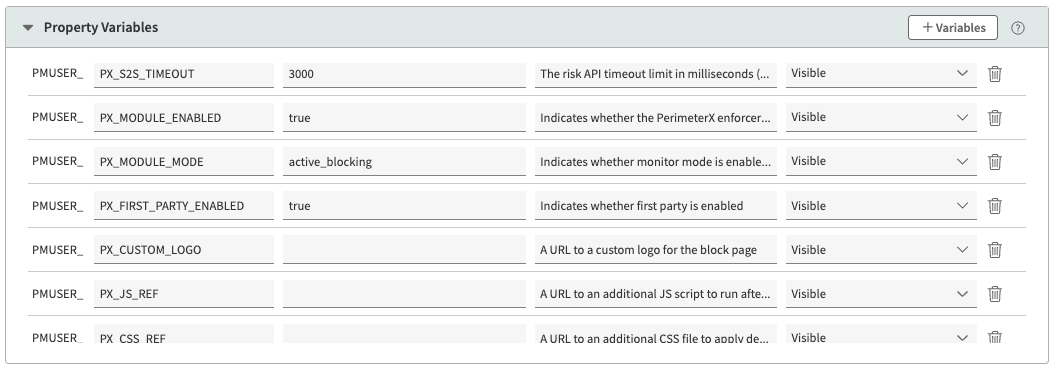
Akamai Property Variables
A number of Property Variables will be added to your Akamai Property Manager. Some of these variables should be modified to reflect your desired configuration; others are placeholders and should be left blank. See the Configuration section for more details.
Akamai Property Rules
The following Property Manager Rules will be added to the bottom of your Akamai Property Manager. Any values in brackets should be replaced with the values relevant to your application (e.g., <app_id_without_px>, <filtered_routes>). The rules should match the provided screenshots below.
 HUMAN Rule Hierarchy
 HUMANEnforcer Rule
HUMANGeneralEnforcer
HUMANFirstParty Rule
HUMANSensor Rule
HUMANCaptcha Rule
HUMANXHR Rule (Part 1)
HUMANXHR Rule (Part 2)
HUMAN2Cookie (Part 1)
HUMAN2Cookie (Part 2)
HUMAN2Cookie (Part 3)
HUMANCookie2Pass Rule
HUMANCookie2Block Rule
 HUMANEnforcerFiles Rule
 HUMANOriginPath Rule
HUMANEnforce Rule (Part 1)
 HUMANEnforce Rule (Part 2)
 HUMANPost Rule
HUMANRiskApi Rule
HUMANAsyncActivities Rule
HUMANPostRequestRouting Rule
 HUMANPostForward Rule