Manually install the Azure Front Door Enforcer
If your organization uses Azure Front Door, you can use HUMAN’s Azure Front Door Enforcer to protect against malicious behavior, which dictates how traffic should be handled per your organization’s standards. The Azure Enforcer combines Azure’s Front Door CDN caching functionality with the Azure Function App’s ability to run serverless code in the cloud.
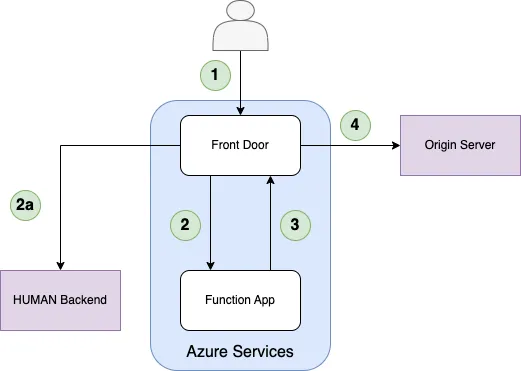
- The client sends a request to Azure Front Door.
- Front Door sends the incoming request to the Function App origin group.
- Reduces Function App invocations in the case of First Party requests.
- If the Enforcer in the Function App passes the request, the Azure Function proxies the request back to the same Front Door domain.
- If not found in the cache, the Front Door Rule Set sends the request to the origin server.
You can learn how to install the Azure Front Door Enforcer with this article.
We highly recommend using the Deploy Tool method instead of a manual installation if possible. See Azure Front Door’s primary installation article for more information.
Prerequisites
- An Azure subscription with at least a Contributor role and the following providers:
Microsoft.Cdn(for Front Door)Microsoft.Storage(for Storage Accounts)Microsoft.Sites(for App Service)Microsoft.Resources(for Resource Groups)Microsoft.Web(for Function Apps)
- A Function app
- NodeJS v16.x or higher.
Installation
Functions App
1. Create a Function App.
In the Azure Portal, create a new Function App resource. Provide a name and resource group for the Function App.
- Select Publish: Code
- Select Runtime: Node.js
- Select Version: 18 LTS
- Select the region, OS, and hosting plan you prefer
2. Configure and compile the JavaScript code.
Importing as SDK into an Existing Function App
If you’re utilizing the Functions App for processing HTTP requests from your Front Door already, you can install the Azure Enforcer as an SDK into your JavaScript project.
Refer to the API documentation and the example in the example folder of the library for how to best integrate with your project.
Creating a New Function
If you’re creating a brand new HTTP trigger function, use the Azure Enforcer template available in GitHub.
- From the root of the template, install dependencies by running
npm install. - Modify the
EnforcerFunction/config.jsonfile with your desired configuration. - Build the project by running
npm run functionapp:compile. - The
EnforcerFunctionfolder will contain the compiledindex.jsfile that will be used for the Function App.
3. Configure and deploy Function App.
You can deploy to Azure by running the Azure Functions Core Tools command to publish the Function App.
The Azure Enforcer also provides host.json and function.json files as examples of working Function App configurations. Feel free to use these JSONs as provided, or modify your existing Function App to conform to the following settings:
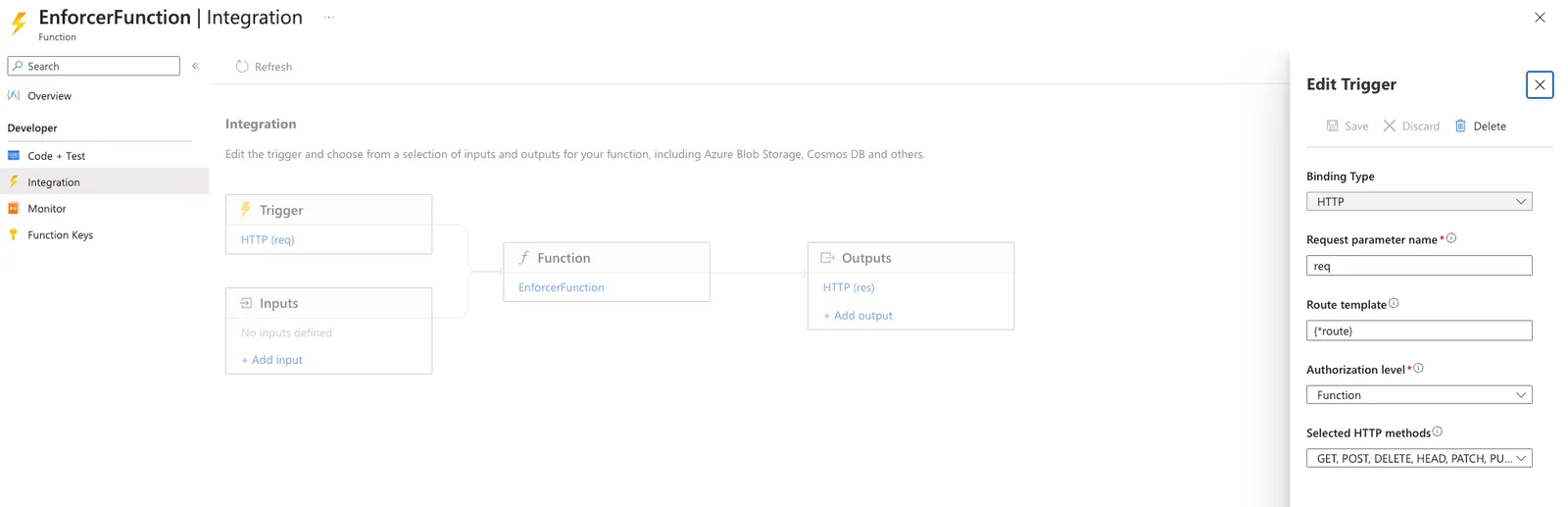
- The route prefix is set to an empty string (see the
host.jsonfile). See here for more information. - The route trigger is set to
{*route}, which translates to all routes (see thefunction.jsonfile). - The method trigger is set to all possible methods (see the
function.jsonfile). - The authorization level is set to function (see the
function.jsonfile). This means invoking the function requires an API key. See here for more information.
Deploy the compiled JavaScript code to the Azure portal via the Azure Functions Core Tools, the Azure VS Code extension, or simply by copy-pasting these files to the new Function.
Front Door (Standard Tier)
1. Add origin groups to your Azure Front Door.
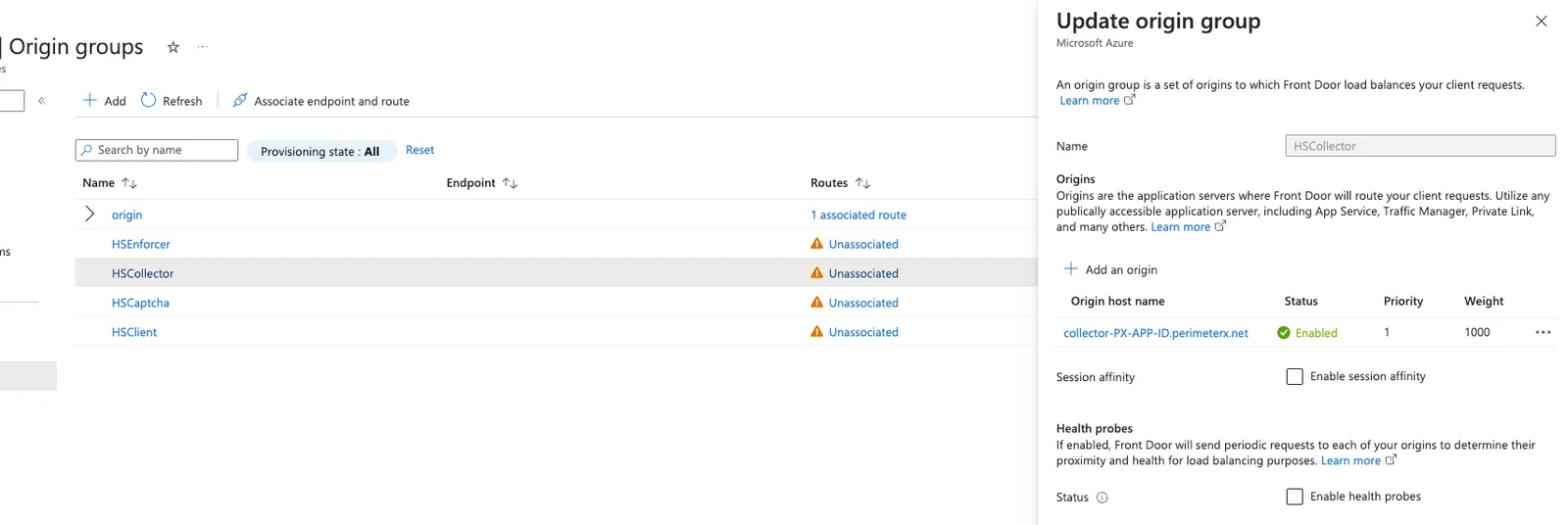
Add the origin groups with the origin host names below to your Azure Front Door. Each origin group can have a single origin.
- HSClient:
client.perimeterx.net - HSCaptcha:
captcha.px-cdn.net - HSCollector:
collector-<APP_ID>.perimeterx.net - HSEnforcer:
<FUNCTION_APP_NAME>.azurewebsites.net
Health probes and session affinity can be disabled for these origin groups as there is a single origin per group.
2. Add the following Rule Set to your Azure Front Door.
A Front Door Rule Set allows for changing the origin group of the incoming request based on certain parameters. The Rule Set for the Enforcer serves to proxy first party requests to the appropriate Human Security backend (HSClient, HSCaptcha, or HSCollector), as well as proxy unverified requests through the enforcer in the Function App. The Rule Set should contain the following rules in this order:
- HSFirstPartyHeaders: Adds necessary headers to first party requests. The default first party prefix as well as any custom first party prefixes or routes should be added here.

- HSFirstPartyClient: Reroutes first-party sensor script requests directly to the HSClient origin to reduce Function App invocations. The default first party sensor route as well as any custom first party sensor routes (based on the custom first party prefix and custom first party sensor endpoint configurations) should be added here.

Stop evaluating remaining rules: True
- HSFirstPartyCaptcha: Reroutes first-party captcha script requests directly to the HSCaptcha origin to reduce Function App invocations. The default first party sensor route as well as any custom first party sensor routes (based on the custom first party prefix and custom first party captcha endpoint configurations) should be added here.

Stop evaluating remaining rules: True
- HSFirstPartyXHR: Reroutes first-party XHR requests directly to the HSCollector origin to reduce Function App invocations. The default first party sensor route as well as any custom first party sensor routes (based on the custom first party prefix and custom first party XHR endpoint configurations) should be added here.

Stop evaluating remaining rules: True
- HSFilterExtension: Filters static content requests to reduce Function App invocations. This corresponds to the filter by extension configuration.

Stop evaluating remaining rules: True
- HSUnenforcedRequest: Routes requests that have not yet been processed by the enforcer to the HSEnforcer origin.

Stop evaluating remaining rules: True
- The condition checks if the
x-enforcer-authheader is equal to some[SECRET_KEY]. This header signifies to Front Door that the request has been processed by the enforcer. The value can be configured to be whatever string you like; however, it must be configured identically in both the Front Door rule and the Function App. - The condition adds an
x-function-keyheader. This header is what allows Front Door to trigger the Function App. The[FUNCTIONS_KEY]value should be the Function App’s default function key. See the HTTP Trigger Authorization Levels for more information.
3. Associate the Rule Set with the routes you want to protect on your Front Door Endpoints.
This activates the Rule Set on the Front Door endpoint. For more information, see how to configure Front Door endpoints.
Front Door (Classic Tier)
1. Add the Enforcer backend pool to your Azure Front Door.
Add a new backend pool to your Azure Front Door setup. The backend pool should have a single backend host name that points to the Azure Function App.
- HSEnforcer:
<FUNCTION_APP_NAME>.azurewebsites.net
Health probe can be disabled for this backend pool as there is a single backend.
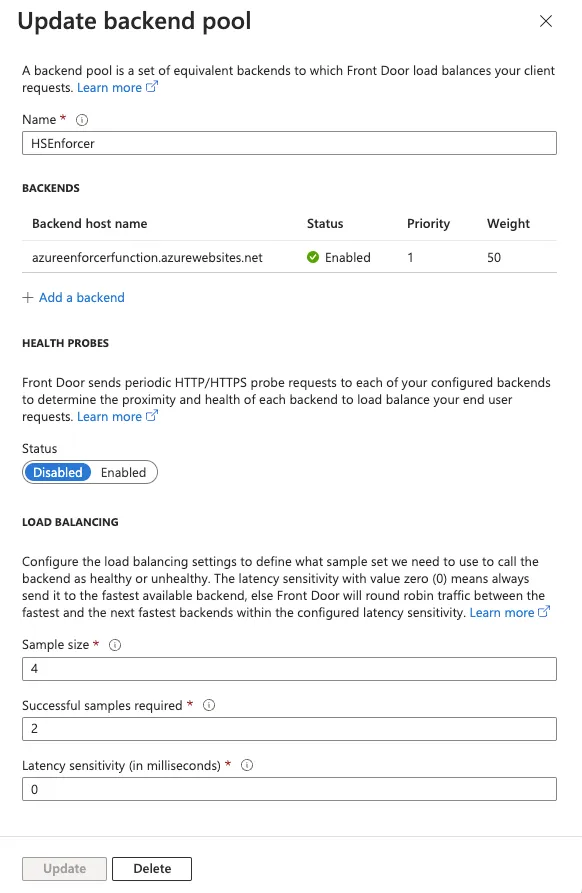
2. Add the HSEnforcerRule Rules Engine to your Azure Front Door.
A Front Door Rules Engine allows for changing the backend pool of the incoming request based on certain parameters. Create a new Rules Engine named HSEnforcedRule.
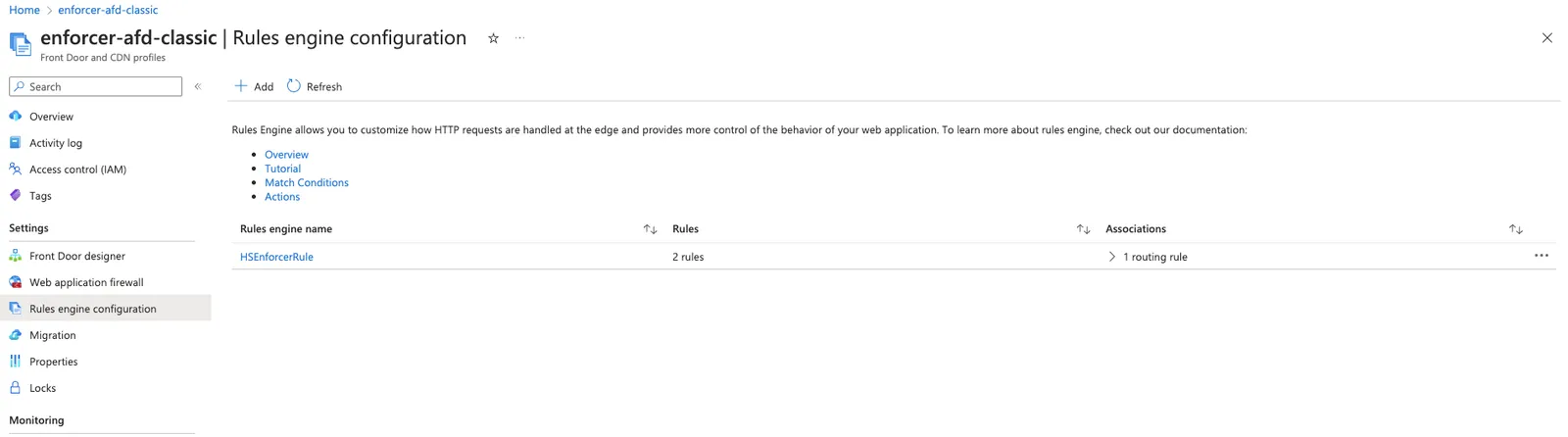
This Rules Engine will proxy unverified requests through the enforcer in the Function App. It should include two rules in this order:
- HSFilteredExtensions: Routes filtered extensions to directly to the origin rather than having them pass through the Function App enforcer. Notice that first party requests must still be proxied to the Function App.
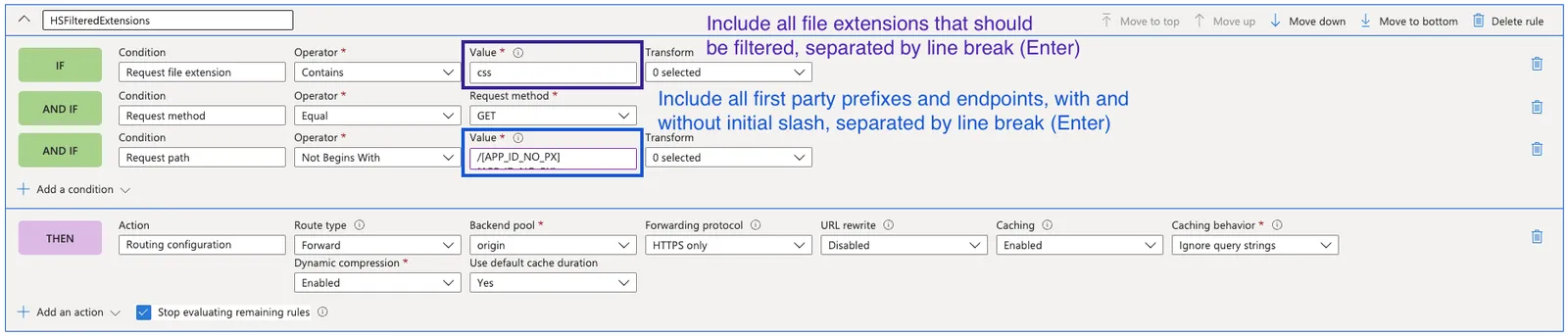
Stop evaluating remaining rules: True
- HSUnenforcedRequest: Routes requests that have not yet been processed by the enforcer to the enforcer origin.

- The condition checks if the
x-enforcer-authheader is equal to some[SECRET_KEY]. This header signifies to Front Door that the request has been processed by the enforcer. The value can be configured to be whatever string you like; however, it must be configured identically in both the Front Door rule and the Function App. - The condition adds an
x-function-keyheader. This header is what allows Front Door to trigger the Function App. The[FUNCTIONS_KEY]value should be the Function App’s default function key. See the HTTP Trigger Authorization Levels for more information.
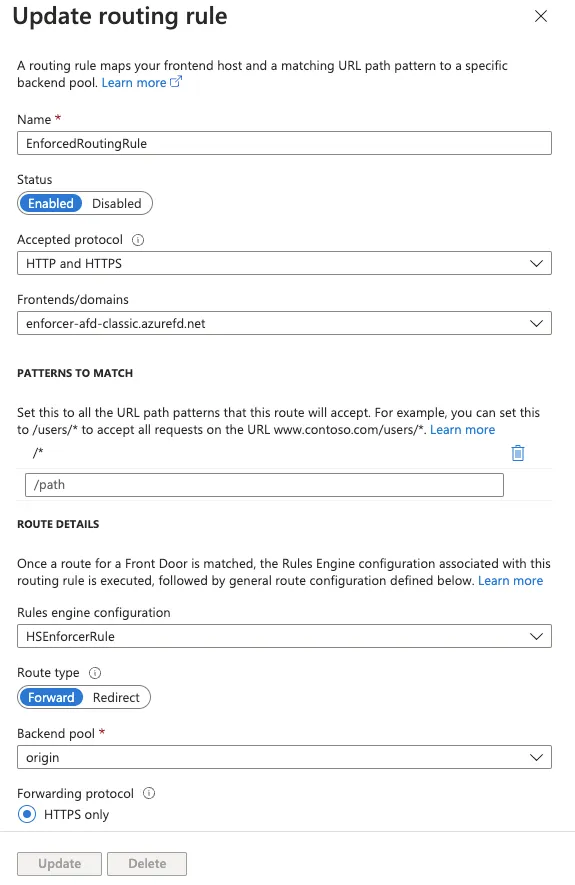
3. Create a routing rule that routes to your desired origin and call the HSEnforcerRule Rule Set.
The routing rule should direct whichever paths you want to protect to the origin backend pool. Associating the HSEnforcerRule Rule Set with the routing rule will ensure these requests pass through the enforcer Function App prior to reaching your origin.