

Installation
- Ensure all prerequisites are satisfied.
- Add the HUMAN Enforcer VCL files, snippets, conditions, and logging endpoints.
- Configure the HUMAN Enforcer using the
PX_CONFIGSandPX_CUSTOMVCL files. - Modify the
MAINVCL file (or upload a default one) to invoke the enforcer flow.
Prerequisites
1. Enable HUMAN Support.
In order to enable the HUMAN support on your Fastly service, the HUMAN Fastly Enforcer requires advanced functionality from Fastly.
Send the following e-mail to support@fastly.com:
- Subject: “Please enable HUMAN support for our Fastly service ID”
- Body: Please enable HUMAN support for our service ID and confirm when it is completed.
Once Fastly enables HUMAN support, the following pragmas should be enabled at your service:
fix_unsent_body_drain- pragma that can be used in VCL to resolve an issue with HTTP response bodies not being fully sent to the client.no_body_if_bereq_is_get_or_head- pragma that can be used in VCL to prevent a response body from being sent to the client if the request method is GET or HEAD.
You must request to enable functionality for each service ID that is being protected by HUMAN. If this functionality is not enabled, requests will fail with a 503 Service Unavailable error.
To check that the required pragmas are enabled, open the generated VCL file in your Fastly service and look for the following lines at the pragmas section at the top of the file:
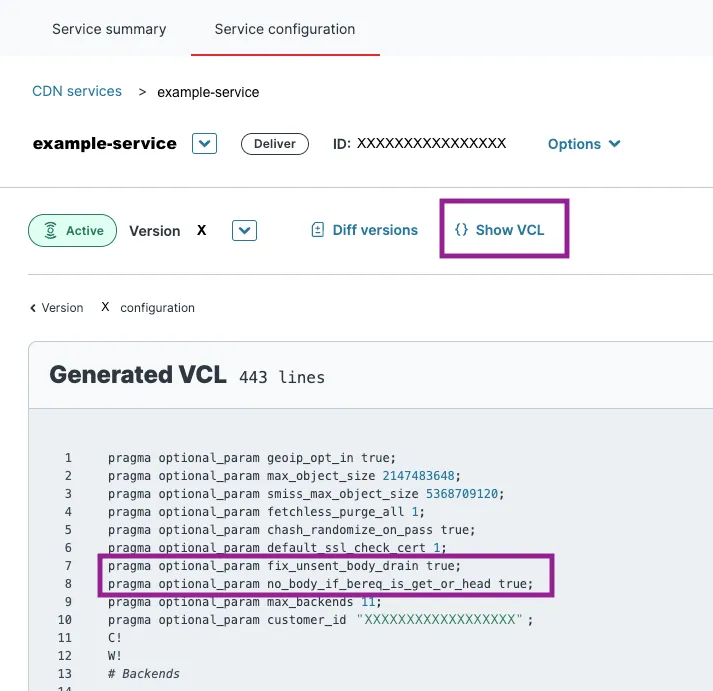
If both the fix_unsent_body_drain and no_body_if_bereq_is_get_or_head pragmas are there, HUMAN has been enabled for the service.
Uploading the HUMAN Enforcer Files
The HUMAN Fastly VCL Enforcer comprises logging endpoints, snippets, conditions, and custom VCL files. All these components work together to provide the required enforcement functionality.
Before starting the integration process, we recommend that any existing custom VCL files and snippets be reviewed by a HUMAN Solution Architect. Contact your HUMAN Solution Architect or HUMAN Support for more information.
1. Add the required Custom VCL files.
The HUMAN Fastly VCL Enforcer consists of 3 custom VCL files that need to be uploaded to your service. These three files define the logic, configurations, and desired customizations for the VCL enforcer. These VCL files will be provided to you by a HUMAN Solution Architect.
You may upload the files via the Fastly Console by following the instructions here or you can create the VCL files using the Fastly API or Fastly CLI.
* VCL file names are case-sensitive.
The HUMAN Enforcer logic reserves a few error codes for specific cases to help navigate between different Fastly workflow states. These error codes should remain unused by other VCL logic in the Fastly services, as using any of the following codes may lead to unexpected behavior.
| Error Code | Meaning |
| ---------- | ------------------------------------------------------------ |
| 990 | custom_preflight_handler |
| 991 | first_party_disabled |
| 992 | first_party_xhr_disabled |
| 995 | exceeded_rate_limit, s2s_high_score, cookie_high_score |
| 996 | cookie_high_score |
2. Add the required Logging Endpoints.
The HUMAN Enforcer uses two HTTPS logging endpoints: PX-Async-Activities and PX-Telemetry. The PX-Async-Activities logging endpoint sends asynchronous activities (e.g., page_requested, block) to HUMAN’s servers. The PX-Telemetry endpoint enables the telemetry feature, which can send on-demand data about the enforcer configuration to HUMAN.
If you’re using the Fastly Console, create the logging endpoints with the following settings (for any field not mentioned, use the default value).
-
PX-Async-Activities
-
Name: PX-Async-Activities
-
URL: https://collector-<APP_ID>.perimeterx.net/api/v1/collector/s2s
-
Placement: none
-
Maximum bytes: 500000
-
Advanced Options
-
Content type: application/json
-
JSON log entry format: Array of JSON
-
PX-Telemetry
-
Name: PX-Telemetry
-
URL: https://collector-<APP_ID>.perimeterx.net/api/v2/risk/telemetry
-
Placement: none
-
Maximum Logs: 1
-
Advanced Options
-
Content type: application/json
If you’re using the Fastly API or Fastly CLI, the following JSON objects can be used to generate these same logging endpoints.
3. Add the required VCL Snippets.
VCL Snippets are small bits of logic that can be included and invoked at various points in the Fastly service. While most of the Enforcer logic is contained in the custom VCL files, snippets are required when it is necessary to modify the logic inside Fastly’s default macros (more information here).
The px_shield snippet is required for Fastly Shielding functionality to stay enabled after a restart triggered by the Enforcer. See more information on enabling and disabling shielding here.
If you’re using the Fastly Console, create the snippet with the following settings (for any field not mentioned, use the default value).
-
px_shield
-
Name: px_shield
-
Type: within subroutine - recv (vcl_recv)
-
VCL:
set var.fastly_req_do_shield = (req.restarts == 0 || (req.restarts == 1 && req.http.px-tmp:internal-flow == "1")); -
Advanced Options:
-
Priority: 1
If you’re using the Fastly API or Fastly CLI, the following JSON object can be used to generate the same snippet.
4. Add the optional WAF Prefetch Condition.
This step is not applicable if using Fastly Next-Gen (Signal Sciences) WAF. If you are using Fastly Next-Gen (Signal Sciences) WAF, reach out to your HUMAN Solution Architect.
If you are using Fastly WAF, we recommend adding condition to your Fastly service to address a potential issue that may arise from running WAF rules multiple times. This condition will effectively prevent the duplication of WAF activations and ensure a smoother operation of the integration for customers who have enabled Fastly WAF but have not implemented the WAF prefetch condition.
If you’re using the Fastly Console, create the condition with the following settings (for any field not mentioned, use the default value).
- PX-Waf-Prefetch-Condition
- Name: PX-Waf-Prefetch-Condition
- Type: prefetch
- Apply If:
req.backend.is_origin && !req.http.bypasswaf - Advanced Options:
- Priority: 10
If you’re using the Fastly API or Fastly CLI, the following JSON object can be used to generate the same condition.
5. Enable the Remote Configuration feature (optional).
The HUMAN Fastly VCL Enforcer supports the remote configuration feature, which allows you to update the enforcer configuration from the HUMAN Portal without redeploying your Fastly service. The remote configuration feature makes use of Fastly dictionaries to store the configuration.
- A remote configuration secret
- A logger authentication token
To enable this feature, follow the steps below.
- Set the
px_remote_config_secretin the enforcer configuration in thePX_CONFIGScustom VCL file. - Create a Fastly dictionary named px_enforcer_config_rdata via the Fastly Console, CLI, or API. This dictionary should be left empty and will be populated with entries by HUMAN. Remove the table declaration of the same name in the
PX_CUSTOMVCL. - Add the two required entries to the cs_data table (or dictionary).
- Create a new logging endpoint named
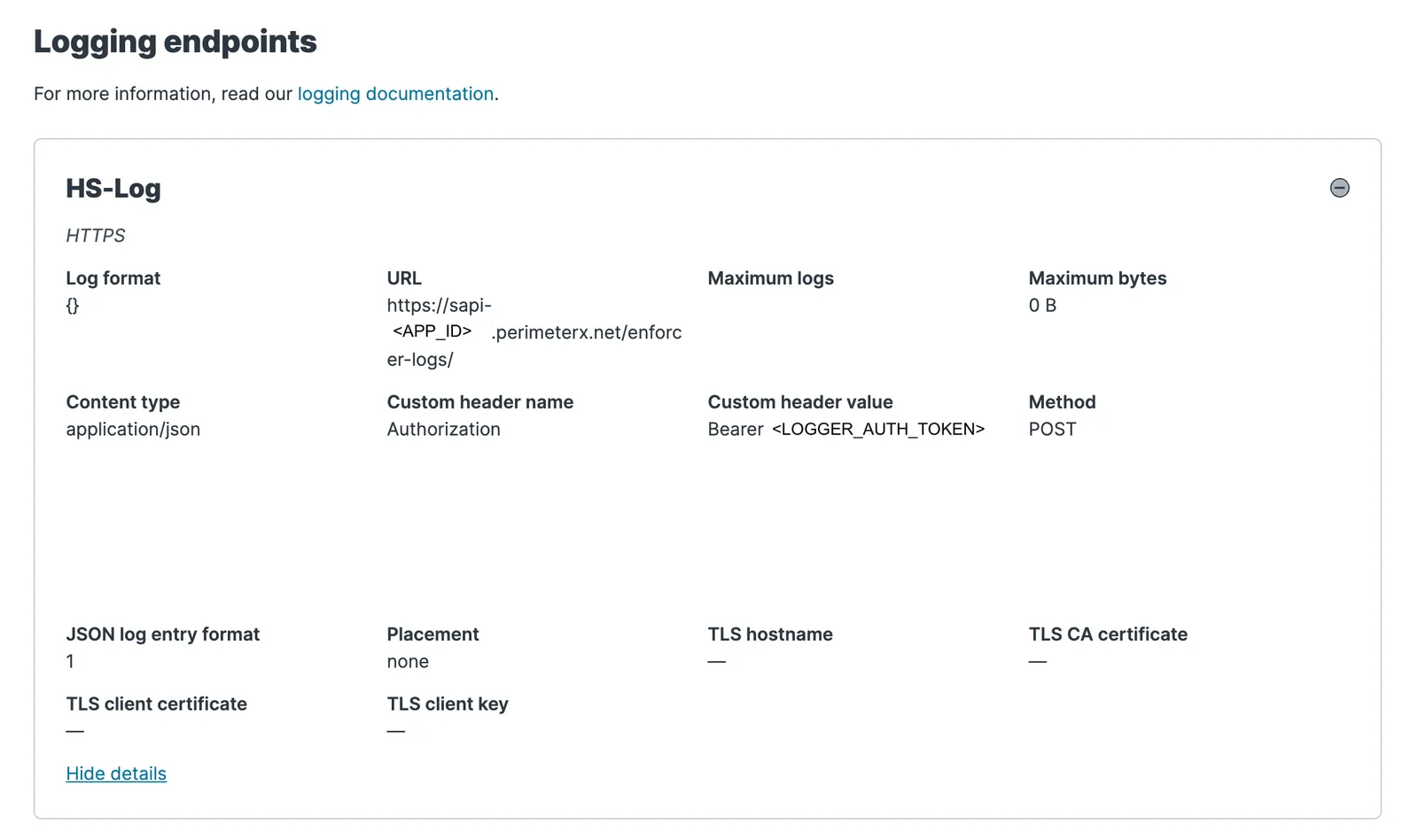
HS-Log. If you’re using the Fastly Console, create the logging endpoint with the following settings (for any field not mentioned, use the default value).
- HS-Log
- Name: HS-Log
- URL: https://sapi-<APP_ID>.perimeterx.net/enforcer-logs/
- Placement: none
- Format:
- Advanced Options
- Content type: application/json
- Custom Header Name: Authorization
- Custom Header Value: Bearer <LOGGER_AUTH_TOKEN>
- JSON log entry format: Array of JSON
- Log Line Format: Blank
If you’re using the Fastly API or Fastly CLI, the following JSON object can be used to generate these same logging endpoints.
6. Add the optional Logging Endpoints.
The HUMAN Fastly Enforcer can send messages about the Fastly request flow to logging endpoints configured in the Fastly Service. The enforcer can send two kinds of logs depending on the configured px_logger_severity: debug and error.
To receive enforcer logs, follow the steps below:
- Set the
px_logger_severityconfiguration in thePX_CONFIGVCL file to the logging level desired. If error logs are desired, setpx_enable_error_logsto"true". - Create a logging endpoint with the name
PX-DebugorPX-Error. Depending on the logging endpoint type, you’ll have to configure where you want the logs to go (e.g., URL). Other settings can typically stay as the default values. - Activate the service.
If you need to turn on enforcer logs temporarily and you don’t have an existing logging endpoint where you can easily view the logs, Fastly’s online log viewer may provide a quick and easy solution.
Configure the HUMAN Enforcer
1. Add your configurations to the PX_CONFIGS file.
The PX_CONFIGS file declares a Fastly VCL table named px_configs. This table is where the enforcer configuration is defined. All possible configurations for this table are documented here. At a minimum, the px_configs table should contain the application ID, authentication token, and cookie secret associated with your application.
The PX_CONFIGS file also declares a Fastly backend named PX_API . This backend will be used to execute Risk API requests. The only value that should be changed here is the value of .host, in which <PX_APP_ID> should be replaced with your application’s ID. (For instance, if your app ID is PX12345678, then the .host value of the PX_API backend should be set to sapi-PX12345678.perimeterx.net.)
All other settings in this file can be left as is.
2. Add custom logic to the PX_CUSTOM file.
The PX_CUSTOM file serves as an extension of the PX_CONFIGS file where more complicated configurations and custom enforcer logic can be defined. The implementations of the subroutines defined in this file can be modified to customize the enforcer behavior as desired. Explanations and sample implementations of all the subroutines are documented here.
Modify (or Add) the MAIN VCL File
There is no single entry point for VCL code. Instead, Fastly exposes a number of different subroutines that function as “hooks” during the various stages of the VCL request lifecycle. These specific subroutines (e.g., vcl_recv, vcl_deliver) must be defined in a special custom VCL file known as the MAIN file. Fastly uses a boilerplate MAIN file if one is not explicitly set.
Integrating the HUMAN enforcer into the MAIN VCL requires invoking the appropriate HUMAN subroutine in every VCL hook subroutine.
* px_recv_clustering_fixup should be called after the #FASTLY recv macro.
If you DO NOT have an existing MAIN VCL file…
We recommend using our default MAIN VCL file, which is Fastly’s boilerplate MAIN file with the HUMAN enforcer subroutines already added in all the right places.
The default MAIN VCL file code is available here:
It should look very similar to the boilerplate MAIN VCL file provided by Fastly.
If you DO have an existing MAIN VCL file…
Add the HUMAN Enforcer subroutines (e.g., px_recv, px_deliver) to your VCL hooks (e.g., vcl_recv, vcl_deliver) one by one. Follow these guidelines when adding these subroutine calls:
- The HUMAN subroutines should be called as early as possible in the defined hook. This is because the subroutines use request headers and return statements to switch between different Fastly states and apply HUMAN enforcement logic only when necessary. Plus, calling the enforcement flow in the very beginning helps avoid invoking business logic unnecessarily.
- The HUMAN subroutines should always be called before the Fastly macro (e.g.,
#FASTLY recv,#FASTLY deliver).
The only exception to the above is the px_recv_clustering_fixup subroutine, which should be called immediately after the #FASTLY recv macro.
RECV
MISS
PASS
FETCH
DELIVER
ERROR