

Precheck FAQ
Below are frequently asked questions about Sightline Precheck. See Manage Sightline Precheck settings to learn how to set up Precheck.
What types of traffic does Precheck work on?
Precheck is available for:
- Web traffic
- Mobile webview traffic
Precheck isn’t available for:
- Mobile application traffic
- API requests
- Native SDK applications
- Custom ABR requests
Can I test Precheck on a staging application?
No. However, you can test Precheck using specific IP addresses.
Why can’t I enable Precheck?
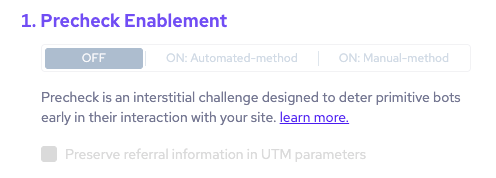
If the Precheck Enablement options are inactive and you can’t turn on Precheck for the application, it’s likely because of one of the following reasons:
- The application doesn’t have the minimum Sensor version needed for Precheck, which is 9.2.7 or higher.
- The application’s Enforcer is in monitoring mode; be sure to set it to active blocking mode.
- The application may not have enough data for Precheck to recommend routes to protect. This typically happens for newly enabled applications.
- The application is a staging application, which isn’t supported by Precheck.
- The application is a production application, but it’s not active or enabled yet.
If you’ve checked all of these and Precheck still isn’t available, contact our support team.
What happens when a visitor is blocked by Precheck?
When Precheck blocks a visitor, that visitor will remain on the Precheck interstitial page indefinitely and won’t be able to access your application.
Does Precheck display again after a user passes the first time?
No, as long as the user has a valid PX cookie the next time they visit a Precheck‑protected route, they will skip the interstitial. More specifically, returning users with intact cookies will not see Precheck again until:
- They clear cookies, or
- They use a new or incognito browser, or
- Something prevents their cookies from being sent or stored
Cookies are refreshed during normal page navigation, so users in an active session will not repeatedly see Precheck either as long as they remain active on your application.
Can routes that are not protected by Precheck be protected some other way?
Traffic on routes outside of Precheck’s protection naturally go through typical Sightline detections unless they are globally filtered or allowlisted. This includes assigning risk scores to requests, sending them to the Enforcer, and blocking them as appropriate. You can further control blocking behavior with:
Why is my analytics tool attributing first-time visitor traffic to direct traffic instead?
Precheck may cause your analytics tools to attribute referred first-time visitor traffic (that is, traffic with a referer header) as direct traffic instead. If you’d like to preserve the referrer attribution, be sure to follow the steps in Configure referrer attribution with UTM parameters before you enable Precheck.
Why is the Enforcer showing 403 responses on Precheck requests?
After enabling Precheck, you may see 403 Forbidden responses from the Enforcer more often. This doesn’t mean that the Enforcer blocked your users. HUMAN intentionally uses 403 responses to indicate that the request was hard blocked or was shown a challenge based on the calculated risk score. These responses should be used as a control signal.
The Enforcer returns a 403 response in two cases:
- When the request was hard blocked without a challenge
- When the request was shown a challenge, including the HUMAN Challenge or the Precheck interstitial. In this case, the Enforcer also returns a JSON or HTML block payload that instructs the client to show the appropriate challenge.
When users are shown Precheck specifically, they’re rerouted through HUMAN’s verification to complete the interactionless challenge. If they successfully complete the challenge, they’re redirected back to their original URL, and any subsequent requests return 2xx successful responses from the Enforcer.
How does HUMAN determine whether to redirect traffic to Precheck?
First, HUMAN checks that traffic meets the minimum requirements for Precheck:
- Your Sensor version is at least 9.2.7 or higher.
- An existing Enforcer set to active blocking mode (not monitoring mode).
- Precheck is deployed to a production environment
Then, for each incoming request, the system effectively answers these questions in order:
- Is the app/environment eligible for Precheck?
- Is this route configured for Precheck (and not excluded)?
- Is this request type supported (web traffic, not SDK/native‑only)?
- Is this traffic filtered out (allowlisted, known bot, exempt campaign, etc.)?
- Is Precheck currently enabled for this app/route?
- Does this request arrive without a valid PX cookie (i.e.
risk_apiwiths2s_call_reason = no_cookie/no_cookie_w_vid)?.
In other words, if all the above pass and there is no valid cookie, the request is redirected to the Precheck interstitial. This runs JavaScript, sets a cookie, and redirects back to the original URL. Otherwise, the request skips Precheck and goes through the normal Bot Defender pipeline.
Why is Precheck not appearing on routes I expect it to?
Precheck may not be appearing on requests due to existing filters or exemptions in Sightline:
- Known bots and crawlers: If the request is from an allowed bot, crawler, or agent, then Precheck will not appear to them even if they request a protected route.
- Digital advertising or social media campaign traffic: Some ad campaign flows are automatically exempted to avoid burning conversion funnels with extra friction from Precheck. You can enable Precheck on these by enabling the Exclude paid traffic option in Precheck settings.
- Other custom allowlisted traffic: Any traffic that matches your allowlisted policy rules are filtered, and Precheck will never appear to them.
However, if routes meet all conditions and aren’t part of any exemptions, then Precheck may not be appearing because it’s disabled. Precheck could be disabled due to any of the following:
- Precheck was disabled in the console. Disabling Precheck from Precheck settings completely turns it off for the entire application. Make sure Precheck is turned on first if Precheck isn’t appearing.
- Precheck was disabled on specific routes. Precheck can be disabled on certain routes manually. Additionally, HUMAN automatically disables problematic routes, such as sustained loops or ones with cookie issues. Make sure the routes you expect would serve Precheck have Precheck enabled.
- Precheck is ramping up. When you enable Precheck, it ramps up enforcement per general path or route. It starts out small with 4% of Precheck traffic, then gradually increases up to 100%. This lets HUMAN monitor for false positives before a full rollout.
- Precheck was disabled due to some other incident. Precheck may preemptively turn off Precheck if there are Sensor or other integration incidents that meet a certain threshold that directly affect Precheck performance. This includes issues such as if something prevents cookies from being baked or if HUMAN detects users are repeatedly seeing Precheck. If this happens, you’ll see a notification appear in the Precheck settings page.