For AI agents: a documentation index is available at the root level at /llms.txt and /llms-full.txt. Append /llms.txt to any URL for a page-level index, or .md for the markdown version of any page.
HUMAN DashboardHUMAN WebsiteRequest a Demo
Product GuidesEnforcer GuidesMobile SDKAPI ReferenceCustomer support
  • Getting Started
    • Overview
    • Best practices
  • Sightline Cyberfraud Defense
    • About Sightline Cyberfraud Defense
    • Getting Started
    • What's different in Sightline Cyberfraud Defense
    • Sensor changelog
    • About the Overview Dashboard
    • Glossary
  • AgenticTrust
    • Getting started with AgenticTrust
    • AI Agents Monitoring Dashboard
    • AI Visitors Overview Dashboard
    • Manage AI Agent Permissions
    • Agentic Activity Priority
    • Agent Trust Levels
  • Account Defender
    • Account Defender Overview
    • Use Cases
    • Prerequisites
    • Getting Started with Account Defender
    • Optimizing Account Defender Detection
    • Validating Account Defender Integration
    • Risk Triggers
    • About Network Events
    • Troubleshooting
  • Bot Defender
    • Bot Defender Overview
    • Detection
    • Bot Defender Policy Settings
    • Footprint
  • Credential Intelligence
    • Credential Intelligence Overview
    • How to Access the Breached Flag
    • Credential Intelligence FAQ
    • Credential Intelligence Dashboard
  • Code Defender
    • Code Defender Introduction
    • Getting Started with Code Defender
    • Code Defender Glossary
    • Website Risk Analyzer
  • Platform
    • Account settings
    • Manage users
    • Role permissions
    • Enforcer configurations
    • Page Type Mapping
    • System Health
  • Client-Side Integration
    • JavaScript tag
    • Improving first page performance
    • Use of cookies & web storage
    • Advanced client integration
LogoLogo
Login
Login
HUMAN DashboardHUMAN WebsiteRequest a Demo
On this page
  • Notifications
  • Monitored issues
Platform

System Health

Was this page helpful?
Previous

Application Protection Pricing

Next
Built with

System Health is a diagnostic tool that monitors your HUMAN integration and notifies you if there’s incorrect or missing data, information, or components. This helps you troubleshoot possible problems as they occur in your integration.

System Health only monitors active production applications and excludes staging or inactive applications.

Notifications

System Health lets you know if there are issues with your integration through a notification in the HUMAN Console.

An example of a System Health banner notification

You can click Resolve Now or the widget that appears to get more information about the issue. You can expand each one for details on how it can affect your HUMAN integration and the recommended steps to resolve it.
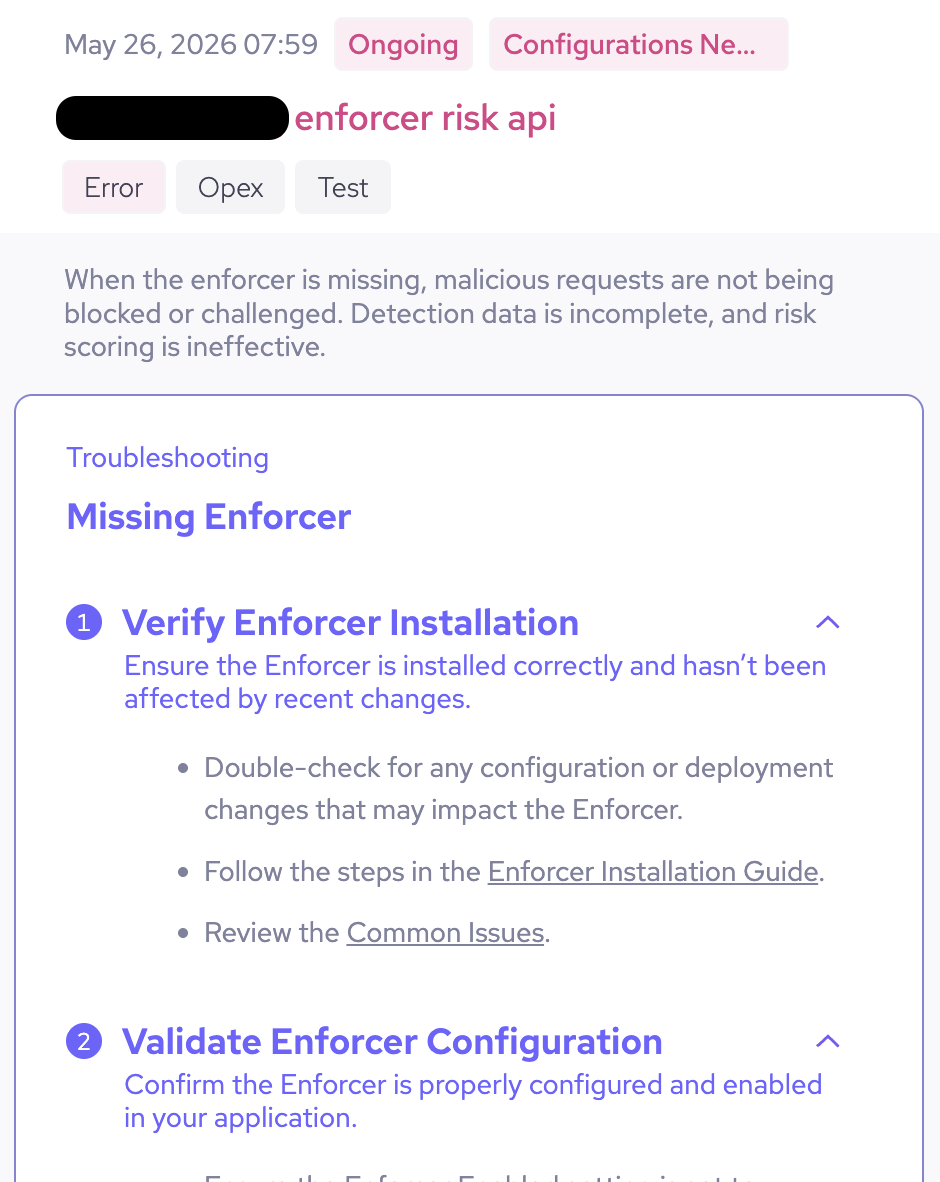
An example of an Enforcer error in the System Health widget

Monitored issues

System Health tracks your system for:

  • Missing Enforcer: Your application does not have an Enforcer or HUMAN cannot detect one.
  • Missing Sensor: If your application does not have the Sensor JavaScript snippet or HUMAN cannot detect one.