For AI agents: a documentation index is available at the root level at /llms.txt and /llms-full.txt. Append /llms.txt to any URL for a page-level index, or .md for the markdown version of any page.
HUMAN DashboardHUMAN WebsiteRequest a Demo
Product GuidesEnforcer GuidesMobile SDKAPI ReferenceCustomer support
  • Getting Started
    • Overview
    • Best practices
  • Sightline Cyberfraud Defense
    • About Sightline Cyberfraud Defense
    • Getting Started
    • What's different in Sightline Cyberfraud Defense
    • Sensor changelog
    • About the Overview Dashboard
    • Glossary
  • AgenticTrust
    • Getting started with AgenticTrust
    • AI Agents Monitoring Dashboard
    • AI Visitors Overview Dashboard
    • Manage AI Agent Permissions
    • Agentic Activity Priority
    • Agent Trust Levels
  • Account Defender
    • Account Defender Overview
    • Use Cases
    • Prerequisites
    • Getting Started with Account Defender
    • Optimizing Account Defender Detection
    • Validating Account Defender Integration
    • Risk Triggers
    • About Network Events
    • Troubleshooting
  • Bot Defender
    • Bot Defender Overview
    • Detection
    • Bot Defender Policy Settings
    • Footprint
  • Credential Intelligence
    • Credential Intelligence Overview
    • How to Access the Breached Flag
    • Credential Intelligence FAQ
    • Credential Intelligence Dashboard
  • Code Defender
    • Code Defender Introduction
    • Getting Started with Code Defender
    • Code Defender Glossary
      • Overview
        • Dashboard
        • Audits
        • Host Domain / Application View
        • Incidents Classification Workflow
        • Analyzer
        • Reports
    • Website Risk Analyzer
  • Platform
    • Account settings
    • Manage users
    • Role permissions
    • Enforcer configurations
    • Page Type Mapping
  • Client-Side Integration
    • JavaScript tag
    • Improving first page performance
    • Use of cookies & web storage
    • Advanced client integration
LogoLogo
Login
Login
HUMAN DashboardHUMAN WebsiteRequest a Demo
On this page
  • Cookies Report
  • Monthly Report
Code DefenderPortalClient-side Defense

Reports

Was this page helpful?
Previous

Dashboard

Next
Built with

Cookies Report

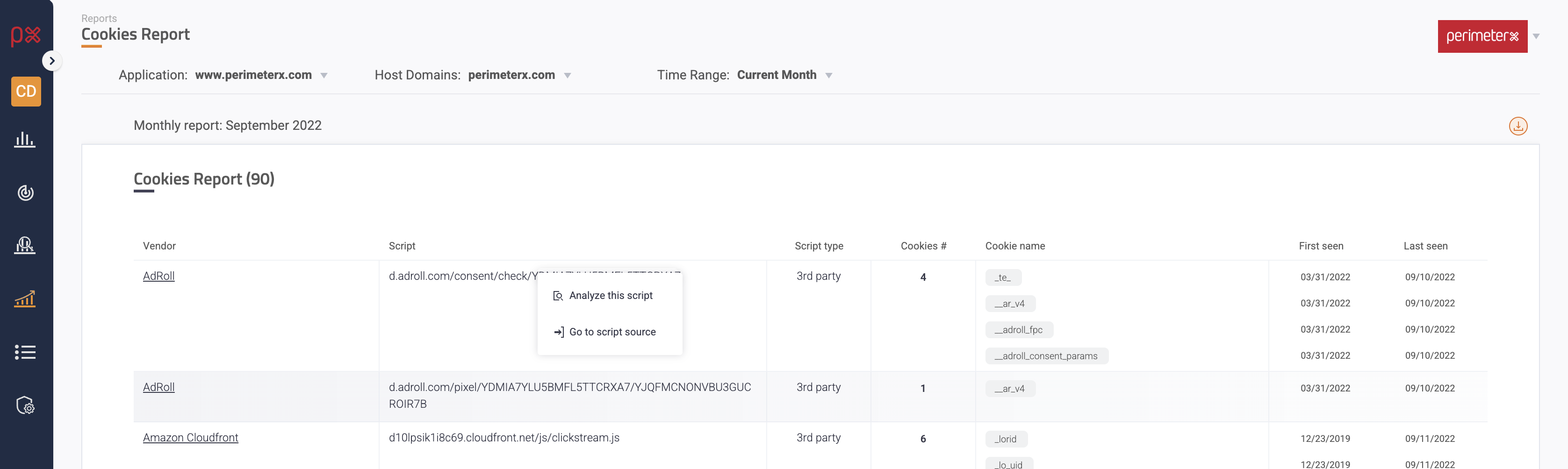
This view shows the full list of cookies that were observed during the selected month, for a given application/host domain. The list will include all the cookies which were active during the month, meaning were first seen prior to or during the selected month and were last seen during the selected month.

Clicking on a script opens a context menu, from which the analyzer can be accessed.
The report can also be downloaded as a CSV.
Monthly Report

This view displays a monthly report, which summarizes all activities, incidents, and information for a specific month.
The reports are accessible from the sidebar by clicking “Reports” -> “Monthly Report”.

A report can be generated for one or more applications/ host domains.
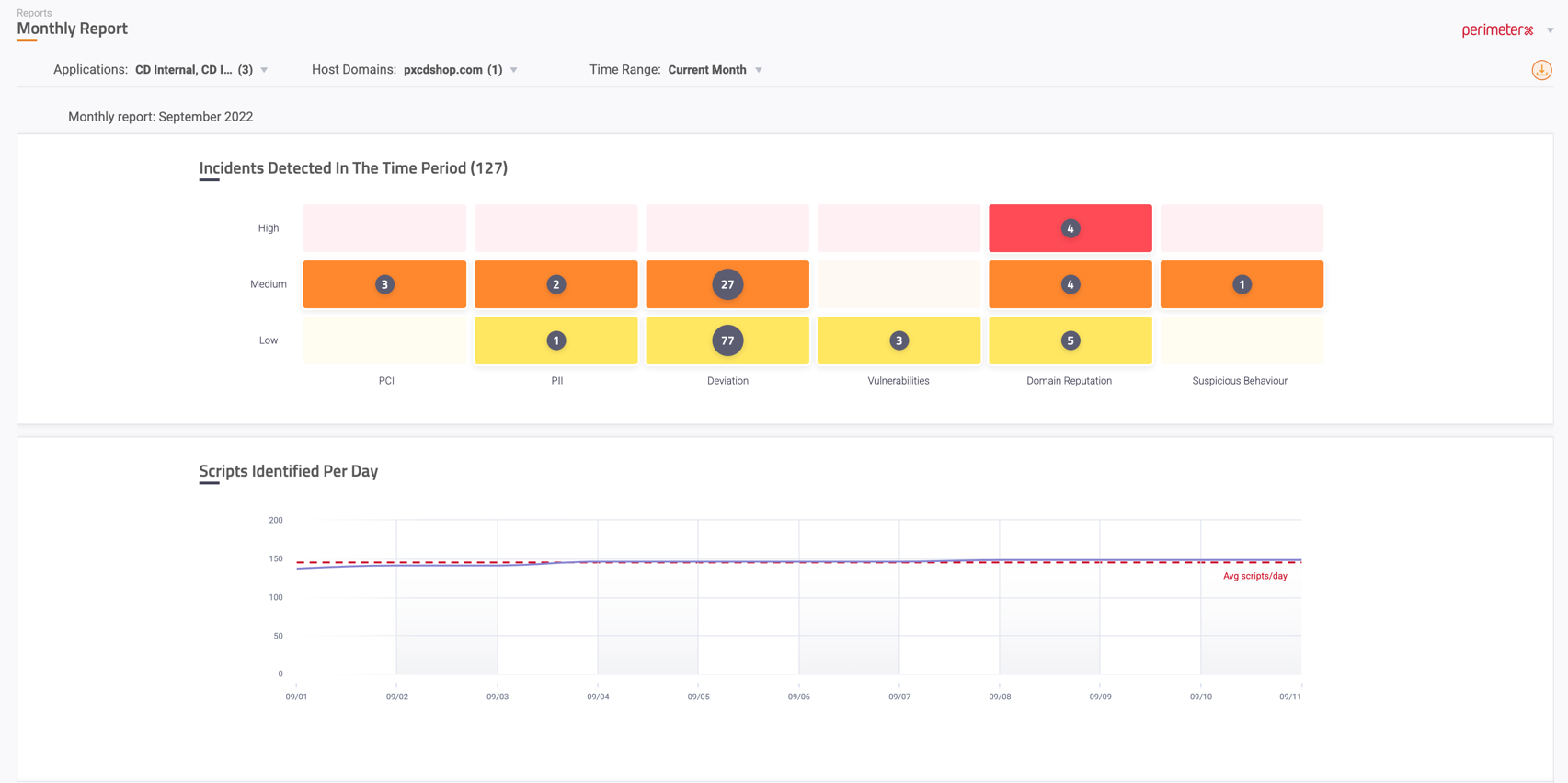
The report contains:

  • Incidents detected in the time period - The information is presented according to the incident type in a heat map.
  • Scripts identified per day - A graph that presents the number of scripts the sensor observed per day in the month. This graph can help follow rollouts and production changes in the website.
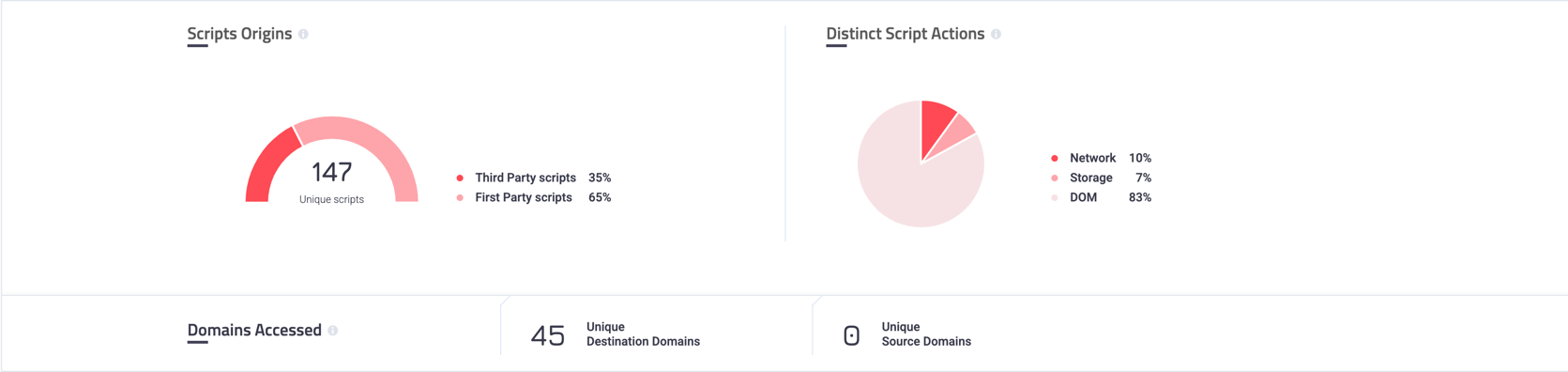
  • Scripts origin - A monthly summary of identified scripts and percentage of the script’s party
  • Distinct Script Actions - A graph that represents the percentage of scripts actions (DOM, Network, Storage)
  • Domains Accessed - The number of unique sources and destinations used by the observed scripts

The report can be exported as a PDF by clicking the Download button on the top right of the screen.