

Getting started with Code Defender
The Code Defender setup process is closely assisted by your personal Solutions Engineer who will go through each step with you and ensure your configuration functions properly.
There are two parts to the setup process:
- Implementation: These are the initial steps you need to complete when you first start with HUMAN. This includes setting up your account and integrating your application with the HUMAN sensor and Enforcer.
- Configuration: This is where HUMAN directly adjusts your Code Defender configurations for optimal detection for your organization’s unique system.
You can get started with the steps below.
Prerequisites
- Access to the HUMAN console, which has the Sensor’s script. If you don’t have an account with HUMAN yet, see our article, Set up your HUMAN account.
- Access your application’s HTML or, at minimum, the
<head>tag - If your organization uses a cookie management solution, then you need access to mark certain cookies as necessary
1. Set up your HUMAN account
To get started, you first need to create an account and log in to the HUMAN console. This gives you access to your application, dashboard, and other information you need for the rest of the onboarding process.
By now, you should have received an email from HUMAN with an invite link to the console. To set up your account:
If you don’t see an email from us, check your spam folder. If it’s still missing, contact us directly to send you a new invite.
- Open the email and follow the link.
- Log in to the console.
- Navigate to Platform Settings > Applications and confirm your application from your trial appears. If it doesn’t, contact HUMAN for help.
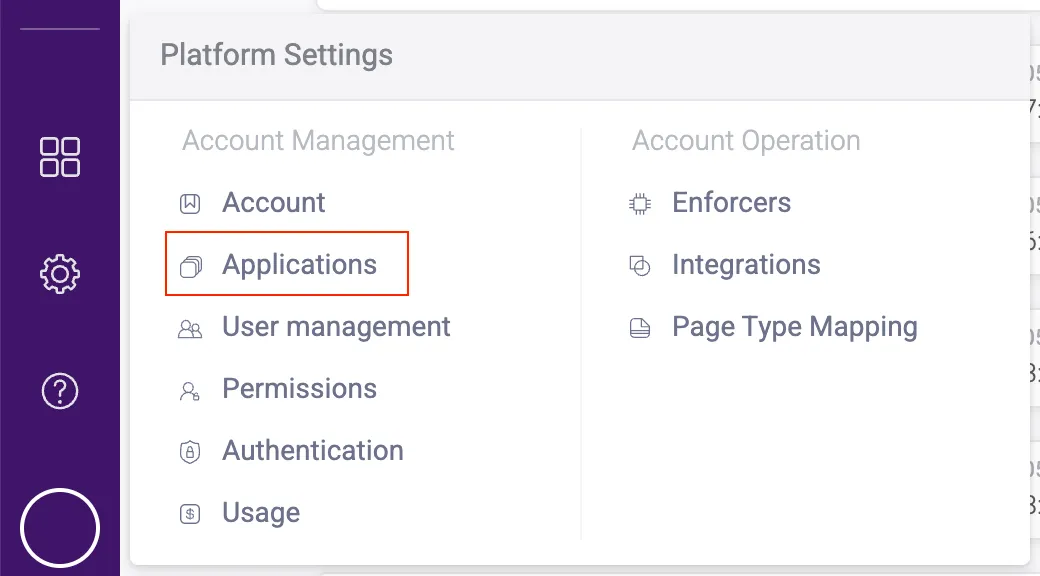
- If you want to add more users, navigate to Platform Settings > User management.
- Click Invite new user and fill out the form that appears.
- Click Invite user. They will receive an invite email to join your HUMAN account.
That’s it! Once you confirm your application appears in the console, you can move on to integrating your sensor.
2. Integrate the Sensor
The HUMAN Sensor is fetched by a JavaScript snippet that goes onto the website or application that you want to monitor. The Sensor is a necessary component of the HUMAN system that collects data on script & header activity and can block malicious script actions if configured by the customer to do so.
- From the HUMAN console, navigate to Platform Settings > Applications.
- Click on the application you want the sensor to monitor.
- Under Application Settings, click Integration details. This will open your integration, Enforcer, and sensor information.
- Select your Integration type, either 3rd party or 1st party.
- If you select 1st party, ensure that the accessible route that appears is accessible on the web server.
If you’re not sure which type to use, then we recommend asking your Solutions Engineer for the one best suited for your environment and product.
- Copy the JavaScript snippet.
- Paste the snippet into all the domains you want to protect. We recommend that the snippet be the first script after the
<head>tag, but if that’s not possible, then it should be inserted as high up in the HTML as possible.- If you choose a first-party integration but do not use a HUMAN Enforcer, which is required for other HUMAN products, you may also need to complete additional implementation steps. See first-party installation for more information.
- Mark the
__pxvidcookie as a necessary cookie in your cookie management solution if you use one. Note that the cookie uses two underscores (_).
After a few hours, you can check the Code Defender Dashboard, which should have data coming in from the Sensor.
First-party installation without an Enforcer
Enforcers are required for Account and Bot Defender, so if you already use one of these on your application, then you can simply add the first-party snippet to your <head> tag as described above.
However, if you only use Code Defender, then you need to complete additional steps to use the first-party snippet. Please contact us for more information or support.
To implement a first-party installation without an Enforcer, you must implement a reverse proxy through your backend. This passes the request for the Sensor resource through your backend to HUMAN’s CDN. The implementation details depend on your backend architecture and, in particular, whether the first endpoint your resource requests hit is a CDN, load balancer, etc.
For example, if you serve resources through a Fastly CDN, you can set it up to proxy the sensor resource request to the HUMAN CDN. Here is an example of how it can be done with a Fastly CDN.

After a few hours, you can check the Code Defender Dashboard, which should have data coming in from the Sensor.
3. Configuration
The Code Defender Configuration phase is primarily completed by the HUMAN team. As part of this phase, the team will ensure your Sensor is properly sending data and that the data that appears is accurate with the Tuning process.
If you ever make a significant change to your HUMAN configuration, such as adding the sensor to run on new domains, we highly recommend contacting our team. We’ll move your configuration back to the Configuration phase to make sure data continues to appear as expected.
If you’re not sure if a change warrants a new calibration, we encourage you to reach out to HUMAN Support.
During this process, your SE will ask you for a list of domains to monitor with Code Defender. This lets us to allowlist these domains so Code Defender can intake data from the proper places in your application. Other than whitelisting domains, the HUMAN team will map your application, group scripts, and create a baseline for behavior in the Code Defender dashboard.
If you use PCI DSS, the Pages Inventory will display pages PCI DSS discovers that are likely to be your checkout pages. Be sure to check these pages for accuracy so the HUMAN team can remove or add any pages as needed.
Once we complete the initial baseline, we’ll meet with your team to present our initial results and confirm that the data that’s shown meets your expectations. After that, you’ve completed your onboarding!