

Other actions
Other actions let you manage events that match your policy rules without necessarily mitigating or sending an alert or data. You can learn how to create these actions with this article.
These actions only support acccount-related events.
Prerequisites
- Appropriate role permissions to add and manage actions. By default, this is an Admin in Sightline.
- An HTTP integration, which you can access from Platform Settings > Integrations > HTTP. For more information, see our help article.
- If you want to send custom data, you need existing custom parameters first. See Set custom parameters for more information.
Create an other action
- Navigate to Sightline Cyberfraud Defense > Settings > Mitigation > Custom Action Settings.
- Under the Other section, click the type of action you want to create.
- Click + Add Action.
- Complete the following fields:
- Action name: The name of the action and how it will appear in your HUMAN account.
- Cooldown duration: The length of time that Sightline should wait to trigger this action each time it detects a match on the Policy Rule it’s assigned to.
- Duration unit: The unit of time for the cooldown duration.
- Integration: Select the integration you want to use.
- Application data source: The application you want to send data from. You can only select one application per action.
- Event type: The type of event you want to use this action for.
- Content Settings: Select each field you want to include in the request. You can’t change any default fields.
- Click Save changes.
Your action has been created. Next, be sure to add it to a policy rule.
Add an action to a Policy Rule
Once you have an action, we recommend adding it to a policy rule.
Be sure your policy rule’s application and event type match the ones you chose above. Otherwise, the action won’t appear when you try to add it to the rule.
- Navigate to Sightline Cyberfraud Defense > Policies > Account Policies.
- Select a rule to edit or create a new rule. See our article for more on creating policy rules.
- From the Actions menu, click and drag the action to the THEN field.
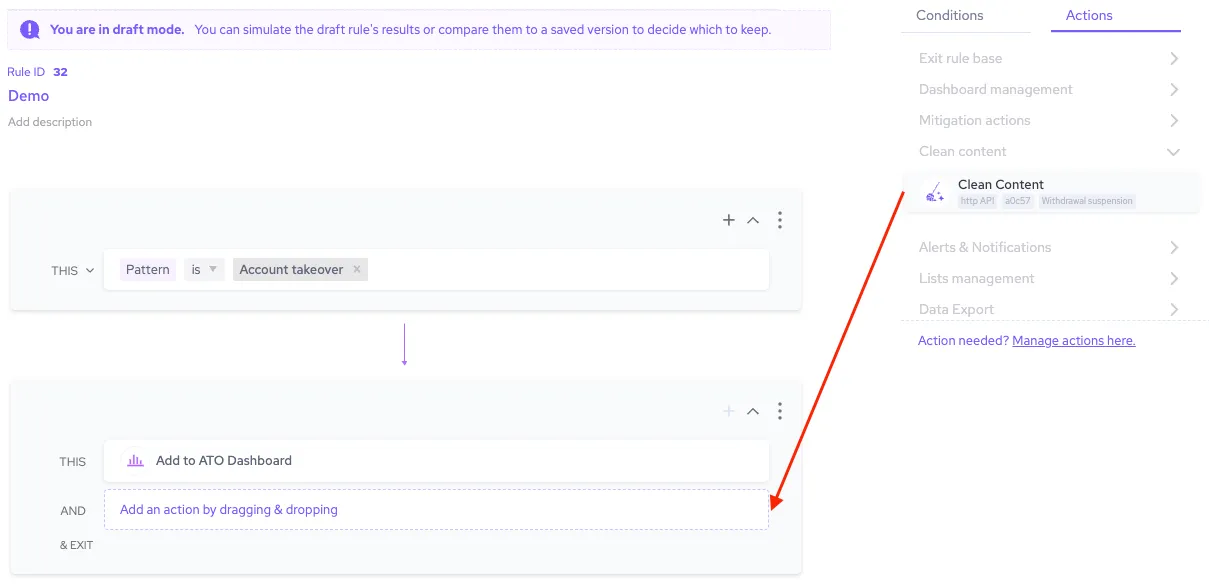
- Finish any other changes to your policy rule, then click Simulate rule.
- Click Save changes.
Now, whenever Sightline detects an attack that matches the conditions in that policy rule, it will trigger your action automatically.