

Getting Started with Bot Defender
The Bot Defender setup process is closely assisted by your personal Solutions Engineer who will go through each step with you and ensure your configuration functions properly.
There are two parts to the setup process:
- Implementation: These are the initial steps you need to complete when you first start with HUMAN. This includes setting up your account and integrating your application with the HUMAN sensor and Enforcer.
- Configuration: This is where HUMAN directly adjusts your Bot Defender configurations for optimal detection for your organization’s unique system. With this process, Bot Defender will have the most accurate possible rate of detection while continuing to distinguish legitimate activity. You don’t need to do anything specific here, but it’s a good opportunity to ask questions and get familiar with Bot Defender.
You can get started with the steps below.
Prerequisites
- To integrate the Sensor:
- Access to the HUMAN console, which has the Sensor’s script.
- Access your application’s HTML or, at minimum, the
<head>tag
- To deploy an Enforcer:
- Each Enforcer’s requirements are slightly different, but generally, you should have the necessary permissions to access and edit settings for your Edge or Origin platform. For example, the Fastly Enforcer needs you to generate Fastly API keys.
1. Set up your HUMAN account
To get started, you first need to create an account and log in to the HUMAN console. This gives you access to your application, dashboard, and other information you need for the rest of the onboarding process.
By now, you should have received an email from HUMAN with an invite link to the console. To set up your account:
If you don’t see an email from us, check your spam folder. If it’s still missing, contact us directly to send you a new invite.
- Open the email and follow the link.
- Log in to the console.
- Navigate to Platform Settings > Applications and confirm your application from your trial appears. If it doesn’t, contact HUMAN for help.
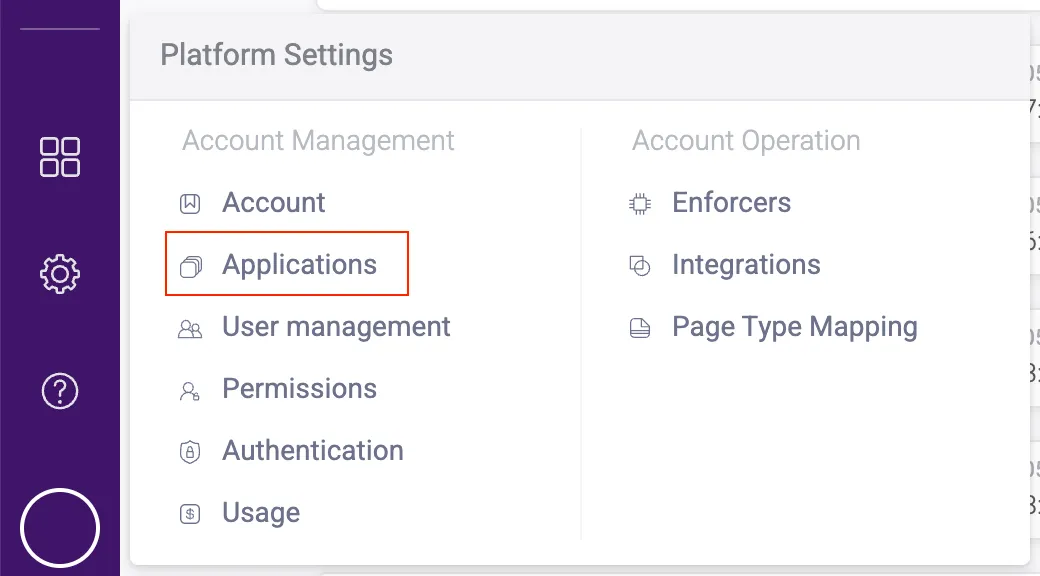
- If you want to add more users, navigate to Platform Settings > User management.
- Click Invite new user and fill out the form that appears.
- Click Invite user. They will receive an invite email to join your HUMAN account.
That’s it! Once you confirm your application appears in the console, you can move on to integrating your sensor.
2. Integrate the Sensor
The HUMAN Sensor is fetched by a JavaScript snippet that goes onto the website or application that you want to protect and monitor. The Sensor is an important component of the HUMAN system that collects and sends data, such as a user’s interaction with the site or a device’s behavior, and analyzes the authenticity of the device or application. Based on the legitimacy of each request, the Sensor sends an encrypted risk score to the HUMAN Enforcer. The Enforcer then blocks or allows that request based on the risk score and your policy rules.
While the Sensor gathers and analyzes application data, it does not block or mitigate traffic. Instead, it sends the data to the Enforcer, which blocks traffic based on the risk score. You’ll set up the Enforcer later on in the onboarding process.
Integrate the sensor in a website
- From the HUMAN console, navigate to Platform Settings > Applications.
- Click on the application you want the sensor to monitor.
- Under Application Settings, click Integration details. This will open your integration, Enforcer, and sensor information.
- Select your Integration type, either 3rd party or 1st party.
- If you select 1st party, ensure that the accessible route that appears is accessible on the web server.
If you’re not sure which type to use, then we recommend asking your Solutions Engineer for the one best suited for your environment and product.
- Copy the JavaScript snippet.
- Paste the snippet into all the domains you want to protect. We recommend that the snippet be the first script after the
<head>tag, but if that’s not possible, then it should be inserted as high up in the HTML as possible.
We also recommend adding your /appid path into your robots.txt file. This ensures that the endpoints that send Sensor activities aren’t exposed to SEO crawlers.
Once you’ve added the snippet, it will start sending data to your HUMAN account.
Integrate the Sensor in a mobile application
See our SDK documentation for information on integrating the Sensor on mobile apps.
Wrap up
After a few hours, you can check your Bot Defender Dashboard, which should have data coming in from the Sensor. However, remember that this is only collected data and traffic; nothing has been blocked yet! To start blocking traffic, move on to Deploy an Enforcer.
3. Deploy an Enforcer
HUMAN has two methods to integrate an Enforcer:
- Deploy Tool method: We highly recommend this method. The Deploy Tool is a lightweight kit that walks you through the installation. Your Solutions Engineer will send this kit to you. The Deploy Tool is available for our most commonly used Enforcers.
- Manual integration: If you already have an Enforcer configuration on your platform or if your preferred platform is not supported by the Deploy Tool, you can always manually integrate your Enforcer.
Deploy Tool method
The Deploy Tool is a kit that a Solutions Engineer will send you that takes you through the deployment step by step. Depending on your platform, you may need to complete some prerequisite steps before running through the Deploy Tool. Make sure to reference your CDN’s specific Enforcer article to complete the full integration.
We highly recommend using the Deploy Tool if you use a supported platform. You should only use the manual integration if your platform is not supported or if you already have an Enforcer configuration deployed on your infrastructure.
You can also customize Enforcers that are supported by the Deploy Tool from the HUMAN Dashboard, which means you don’t need to redeploy the Enforcer whenever you want to change its configuration. You can learn more with our Enforcers article.
Manual integration
If your platform either:
- Is not supported by the Deploy Tool, or
- Already has an Enforcer deployed
Then you must manually integrate your Enforcer with your platform. Manual integration is available for every Enforcer framework. Each method is unique, and you should reference the appropriate Enforcer’s documentation to learn how to deploy it.
You can learn more with General Enforcer Information, and you can browse your full catalogue of Enforcers with Supported Frameworks.
4. Configuration
The Configuration phase involves HUMAN directly adjusting your Bot Defender configurations for optimal detection for your organization’s unique system. By completing this process, your product installation will have the most accurate possible rate of detection while continuing to distinguish legitimate activity.
You do not need to do anything for Bot Defender Configurations. Your Solutions Engineer will conduct Configuration from start to finish.
You can learn more about what’s included in Bot Defender Configuration below.
If you ever make a significant change to your HUMAN configuration, such as adding a new account, domain, or threat type to detect, we highly recommend contacting our team. We’ll move your configuration back to the Configuration phase to make sure data continues to appear as expected.
If you’re not sure if a change warrants a new calibration, we encourage you to reach out to HUMAN Support.
Calibration
During Bot Defender Calibration, HUMAN will map your application and its activity to better understand its behavior. HUMAN measures a variety of signals that Bot Defender collects, such as user agents and IP addresses, to ensure that Bot Defender will best serve your organization’s unique needs.
Once we have mapped your application, we will begin the improvement process until your Bot Defender configuration achieves ideal behavior. This is where we begin to calibrate your Bot Defender configuration over multiple iterations. During this process, you can expect:
- An estimation on your Tuning process duration
- Results gradually improving over time, where blocks may increase if we find that your system needs to be more aggressive or decrease if we find that legitimate users are impacted
- Regular updates on outstanding findings in your Bot Defender configuration
- The opportunity to give feedback on how you observe Bot Defender is performing and to make customizations based on your team’s needs
Continuous Learning
Once our experts from the HUMAN team have reached the necessary level of confidence in the detection learning mechanism, we will notify you and your team that Tuning is complete. Then, you can switch your Enforcer to active blocking (or monitor) mode, and your Enforcer will start to act upon blocked behavior.
When you enter Continuous Learning, you’ve completed your onboarding process!