

Install the Fastly VCL v12 Enforcer
If your organization uses Fastly, you can use HUMAN’s Fastly VCL Enforcer to protect against malicious behavior. The Enforcer is deployed to your content delivery network (CDN) and dictates how traffic should be handled per your organization’s standards.
You can learn how to install the Fastly VCL Enforcer with this article.
This process uses the Deploy Tool, HUMAN’s recommended method for installing and updating the Enforcer. If you prefer a manual method, see our manual installation article.
Prerequisites
- Fastly account with engineer or higher permissions
- Docker or Script, depending on your preferred method to run the deploy tool.
- For Docker, see how to install Docker Desktop with their documentation.
- For Script, install the following:
- An Enforcer configuration file,
enforcerConfig.json, which you can download from the Platform Settings > Enforcers, clicking on the appropriate Enforcer, and clicking Download configuration file . This file has the basic information for Enforcer functionality, such as your Application ID and remote authorization token, already filled in. Be sure to save it in a directory you’ll remember, like/deploy.
Contact Fastly
Fastly needs to activate certain functionality in your service so it works with the HUMAN Enforcer. Fastly is familiar with HUMAN and its Enforcer, so you can simply send them an email to enable it.
This functionality must be manually activated by Fastly for each service you want to add the HUMAN Enforcer to, so you may need to send multiple service IDs.
- From the Fastly dashboard, select the service you want to add the Enforcer to.
- Copy the service’s ID.
- Email support@fastly.com with the following:
- Subject: Please enable HUMAN support for our Fastly service
- Body: Please enable HUMAN support for our service ID, <YOUR_ID_HERE>, and confirm when it is completed.
Fastly will add the following pragmas to your service:
fix_unsent_body_drain: Used to resolve an issue with HTTP response bodies not being fully sent to the client.no_body_if_bereq_is_get_or_head: Used to prevent a response body from being sent to the client if the request method is GET or HEAD.
You can confirm that these pragmas were added by navigating to your service’s Service configuration > Show VCL.
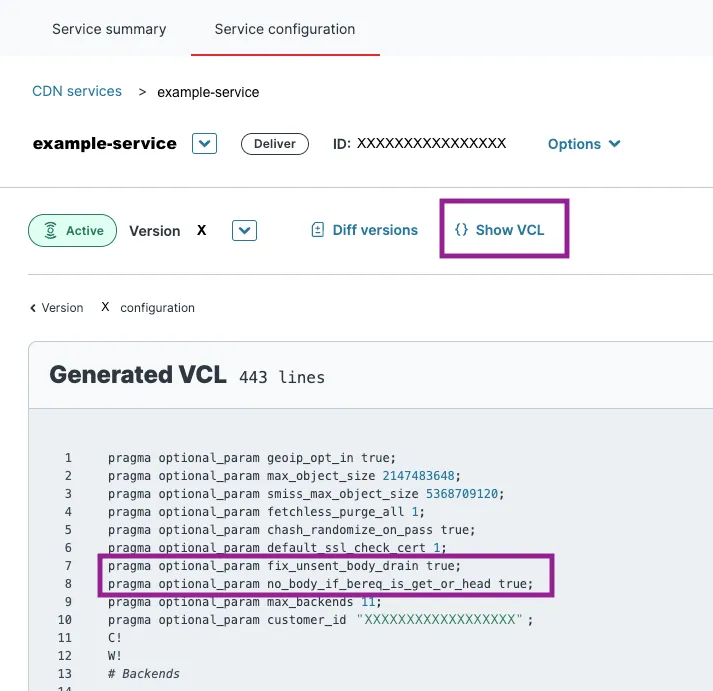
Create a Fastly API token
- Log in to your Fastly account.
- Navigate to Account > API Tokens > Personal tokens.
- Click Create token.
- Enter a name for your token, then fill out the remaining fields according to the following:
- Type: User token. Only available for Fastly Superusers. If you don’t see this field, you can skip this step.
- Scope: Global API access (
global) . Be sure to also deselect Read-only access (global:read), which is selected by default. - Access: All services or the specific services you want to deploy the Enforcer on
- Click Create Token.
- Copy and save the token in a secure location.
This will be the only time you’ll see your token, so be sure to save it before closing the page!
Run the Deploy Tool
First, download and run the Deploy Tool. You can do this by either pulling a Docker image or running a script.
Docker method
Script method
If you’re using Windows, you also need to complete additional steps to set up Docker:
- In your Windows search bar, search for and open Turn Windows features on or off.
- Find the Windows Hypervisor Platform feature and click its checkbox to enable it.
- Click OK to save your changes.
- Open Windows PowerShell as an Administrator.
- Copy and paste in
C:\Windows\System32\wsl.exe --update --web-download, then hit Enter.
- Pull the Docker image by running:
- Navigate to the directory where you saved
enforcerConfig.json. - Run the Deploy Tool with the following:
Deploy the Enforcer
After you run the Deploy Tool, you’ll be prompted with steps to deploy the Enforcer.
- When prompted, select Fastly VCL and hit Enter.
- Follow the prompts that appear to complete the setup process.
- After you complete the setup, confirm that the displayed details are correct, then enter
yto deploy the Enforcer.