For AI agents: a documentation index is available at the root level at /llms.txt and /llms-full.txt. Append /llms.txt to any URL for a page-level index, or .md for the markdown version of any page.
HUMAN DashboardHUMAN WebsiteRequest a Demo
Product GuidesEnforcer GuidesMobile SDKAPI ReferenceCustomer support
  • Getting Started
    • Overview
    • Best practices
  • Sightline Cyberfraud Defense
    • About Sightline Cyberfraud Defense
    • Getting Started
    • What's different in Sightline Cyberfraud Defense
    • Sensor changelog
    • About the Overview Dashboard
    • Glossary
  • AgenticTrust
    • Getting started with AgenticTrust
    • AI Agents Monitoring Dashboard
    • AI Visitors Overview Dashboard
    • Manage AI Agent Permissions
    • Agentic Activity Priority
    • Agent Trust Levels
  • Account Defender
    • Account Defender Overview
    • Use Cases
    • Prerequisites
    • Getting Started with Account Defender
    • Optimizing Account Defender Detection
    • Validating Account Defender Integration
    • Risk Triggers
    • About Network Events
    • Troubleshooting
  • Bot Defender
    • Bot Defender Overview
    • Detection
    • Bot Defender Policy Settings
    • Footprint
  • Credential Intelligence
    • Credential Intelligence Overview
    • How to Access the Breached Flag
    • Credential Intelligence FAQ
    • Credential Intelligence Dashboard
  • Code Defender
    • Code Defender Introduction
    • Getting Started with Code Defender
    • Code Defender Glossary
    • Website Risk Analyzer
  • Platform
    • Account settings
    • Manage users
    • Role permissions
    • Enforcer configurations
    • Page Type Mapping
  • Client-Side Integration
    • JavaScript tag
    • Improving first page performance
    • Use of cookies & web storage
    • Advanced client integration
LogoLogo
Login
Login
HUMAN DashboardHUMAN WebsiteRequest a Demo
On this page
  • Prerequisites
  • Create a custom role
  • Enable an advanced role
  • Default role permissions
  • Account Defender
  • Bot Defender
  • Code Defender
  • Credential Intelligence
  • Sightline Cyberfraud Defense
  • Platforms
Platform

Role permissions

Was this page helpful?
Previous

Sign-on methods

Next
Built with

You can view role permissions as well as create new roles from your Platform settings. Role permissions are split by product. Your account comes with default roles and permissions, which are listed in this article.

Prerequisites

To create and manage custom roles, you need to be at least an IT/Devops Platform role

Create a custom role

If the default roles don’t meet your account’s needs, you can create custom roles with the permissions you’d like.

  1. Navigate to Platform settings > Permissions.
  2. Select the product you want to create a role for.
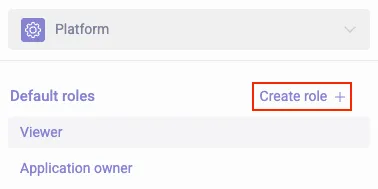
  3. Select + Create role.

A list of default roles and the Create role button highlighted

  1. Enter a name for your role and select an existing role to base the permissions off of. Then, click Start.
  2. Select each permission you’d like to enable or disable for this role.
  3. Click Save changes.

Your new role will appear under Custom roles. You can always edit or delete a role by hovering over it and selecting the corresponding option .

Enable an advanced role

Advanced roles are specialized roles designed for organizations that need more granular user controls beyond the default ones. Advanced roles need to be enabled per product.

Advanced roles are not available for all products.

  1. Navigate to Platform settings > Permissions.
  2. Select the product you want to enable advanced roles on.
  3. Toggle on Advanced roles.

Advanced role toggle highlighted

  1. Confirm that you want to show advanced roles in the popup that appears.

Now, any available advanced roles will appear, and you can assign users those advanced roles. You can also create custom roles based on the advanced ones.

Default role permissions

The following are the default roles and their permissions HUMAN assigns by default per product.

Account Defender

NamePermissions
Viewer
Explore and investigate data
  • View Explore > Dashboard and Investigation
  • View rules Policies > Policy Rules
  • View lists in Policies > List Management
  • View actions in Settings > Action Settings
Admin
Full access to all settings and pages
  • View Explore > Dashboard and Investigation
  • Update an Account status
  • View Explore > Business Insights
  • View and manage rules Policies > Policy Rules
  • View and manage lists in Policies > List Management
  • View and manage actions in Settings > Action Settings
  • Export data into CSVs

Bot Defender

NamePermissions
Viewer
Explore and investigate data
  • View Explore > Dashboards, Investigation, and Reports
  • View Policies > Overview and Policy Settings
  • View Settings > Product Settings, Precheck Settings, and Data > Configuration
Developer
View data and customize integrations
  • View Explore > Dashboards, Investigation, and Reports
  • View Policies > Overview and Policy Settings
  • View Settings > Product Settings, Precheck Settings, and Data > Configuration
  • Developer and integration capabilities
Analyst
Explore, investigate, and manage data
  • View and manage Explore > Dashboards, Investigation, and Reports
  • Exonerate users
  • View and manage Policies > Overview and Policy Settings
  • View Settings > Product Settings, Precheck Settings, and Data > Configuration
  • Developer and integration capabilities
Admin
Full access to all settings and pages
  • View and manage Explore > Dashboards, Investigation, and Reports
  • Exonerate users
  • Activate or disable an application
  • View and manage Policies > Overview and Policy Settings
  • View and manage Settings > Product Settings, Precheck Settings, and Data > Configuration
  • Configure and manage data exports
  • Developer and integration capabilities

Code Defender

NamePermissions
Viewer
Explore and investigate data
  • View scripts, incidents, and actions
  • View reports and audits
  • View vendors
  • View policy rules
  • View PCI DSS data
  • View system settings
Developer
View data and customize integrations
  • View and manage scripts, incidents, and actions
  • View reports and audits
  • View and manage vendors
  • View integrations
  • View notification settings
  • View policy rules
  • Manage Client-side Defense policy rules
  • Manage PCI-DSS policy rules
  • View PCI DSS data
  • Manage PCI DSS justification
  • Manage PCI DSS authorization
  • View system settings
Admin
Full access to all settings and pages
  • View and manage scripts, incidents, and actions
  • View reports and audits
  • View and manage vendors
  • View and manage integrations
  • View and manage notification settings
  • View policy rules
  • Manage Client-side Defense policy rules
  • Manage PCI DSS policy rules
  • View PCI DSS data
  • Manage PCI DSS justification
  • Manage PCI DSS authorization
  • View and manage system settings
PCI Justifier (advanced role)
View and justify scripts

For large enterprises requiring two separate reviewers (an Authorizer and a Justifier) for PCI DSS scripts.

  • View and manage scripts, incidents, and actions
  • View reports and audits
  • View and manage vendors
  • View integrations
  • View notification settings
  • View policy rules
  • View PCI DSS data
  • Manage PCI DSS justification
  • View system settings
PCI Authorizer (advanced role)
View and authorize scripts

For large enterprises requiring two separate reviewers (an Authorizer and a Justifier) for PCI DSS scripts.

  • View and manage scripts, incidents, and actions
  • View reports and audits
  • View and manage vendors
  • View integrations
  • View notification settings
  • View policy rules
  • View PCI DSS data
  • Manage PCI DSS authorization
  • View system settings

Credential Intelligence

NamePermissions
Viewer
Explore and investigate data
  • View Dashboard and Investigation

Sightline Cyberfraud Defense

NamePermissions
Viewer
Explore and investigate data
  • View Overview
  • View Explore > Traffic, Accounts, Reports, and Custom Dashboards
  • View Investigate > Account Takeover, Fake Accounts, and Traffic Analyzer.
  • View Policies > Policy Overview, Policy Settings, Account Policies, and Policy Lists.
  • View Settings > Mitigation and Data Export
Developer
View data and customize integrations
  • View Overview
  • View Explore > Traffic, Accounts, Reports, and Custom Dashboards
  • View Policies > Traffic Policy Overview and Traffic Policy Settings
  • View and manage Policies > Account Policies and List Management
  • View Settings > Mitigation Settings > Challenge Settings and Precheck Settings and Settings > Data Export
  • View and manage Settings > Mitigation Settings > Custom Action Settings and Custom Action Overview
  • Update an Account status
  • Developer and integration capabilities
Analyst
Explore, investigate, and manage data
  • View Overview
  • View and manage Explore > Traffic, Accounts, Reports, and Custom Dashboards
  • View and manage Policies > Traffic Policy Overview, Traffic Policy Settings, Account Policies and List Management
  • View Settings > Mitigation Settings > Challenge Settings and Precheck Settings and Settings > Data Export
  • View and manage Settings > Mitigation Settings > Custom Action Settings and Custom Action Overview
  • Update an Account status
  • Developer and integration capabilities
  • Exonerate users
Admin
Full access to all settings and pages
  • View Overview
  • View and manage Explore > Traffic, Accounts, Reports, and Custom Dashboards
  • View and manage Policies > Traffic Policy Overview, Traffic Policy Settings, Account Policies and List Management
  • View and manage Settings > Mitigation Settings and Data Export
  • Update an Account status
  • Developer and integration capabilities
  • Exonerate users
  • Activate or disable an application
  • Configure and manage data exports

Platforms

NamePermissions
Viewer
Explore and investigate data
  • View account information in Platform Settings > Account
  • View users in Platform Settings > User management
  • View roles in Platform Settings > Permissions
  • View account usage history in Platform Settings > Usage
  • View Enforcer configurations in Platform Settings > Enforcers
Application Owner
Manage application settings
  • View and manage account information in Platform Settings > Account
  • View users in Platform Settings > User management
  • View roles in Platform Settings > Permissions
  • Configure SSO authentication methods in Platform Settings > Authentication
  • View account usage history in Platform Settings > Usage
  • View and manage page type mappings in Platform Settings > Page Type Mapping
  • View Enforcer configurations in Platform Settings > Enforcers
IT/Devops
Manage integrations
  • View account information in Platform Settings > Account
  • View and invite users in Platform Settings > User management
  • View and manage roles in Platform Settings > Permissions
  • Configure SSO authentication methods in Platform Settings > Authentication
  • View and manage integrations in Platform Settings > Integrations
  • View Enforcer configurations in Platform Settings > Enforcers
User manager
Manage user roles and access
  • View and invite users in Platform Settings > User management
  • View and manage roles in Platform Settings > Permissions
Admin
Full access to all settings and pages
  • View and manage account information in Platform Settings > Account
  • View and invite users in Platform Settings > User management
  • View and manage roles in Platform Settings > Permissions
  • Configure SSO authentication methods in Platform Settings > Authentication
  • View account usage history in Platform Settings > Usage
  • View and manage integrations in Platform Settings > Integrations
  • View and manage page type mappings in Platform Settings > Page Type Mapping
  • View Enforcer configurations in Platform Settings > Enforcers