

About the AI Visitors Overview dashboard
The AI Visitors Overview lists visitor sessions operated by an AI agent including the actions they took, the user associated with the session, and which routes they visited. This helps you understand the types of tasks AI agents tend to perform on your applications and assess why each session was blocked or allowed. Then, you make informed decisions on which agents or behaviors you want to control in AI agent permissions based on your organization’s needs.
You can access this dashboard from Sightline Cyberfraud Defense > Explore > Visitors > AI Visitors Overview. You can learn more about what information the dashboard has with this article.
Prerequisites
Your Sensor version must be at least 10.7.1 or higher to collect AI agent data. See our installation instructions to learn how to update to the latest version.
Filters
You can apply filters to the AI Visitors Overview to customize the data and results that appear. These filters apply to the entire dashboard, including the Visitors table and Session details.

Visitors table
The Visitors table lists every AI agent-operated visitor session in the selected time range. This lets you quickly identify recent accounts, agents, and their actions on your applications. The table has the following columns available:
- App Name, Account ID, and Email: The application name, account ID, and, if known, the email address of the session owner.
- Provider and Agent Name: The name of the AI agent and their associated provider.
- Activity: The most sensitive activity the agent conducted during the session and whether it was permitted. See Agentic activity priority for all possible activities and their priority.
- Outcome: Whether the session was blocked or allowed .
- Requests Volume: The number of requests made in the session.
- Session Started: The date and time that AgenticTrust detected the session started in UTC.
- Session Ended: The date and time that AgenticTrust detected the session ended in UTC.
You can filter the table to find specific sessions or click on a specific one to open its Session details.
Session details
Session details has more granular information about each AI agent session and lets you learn more about the agent’s activity. You can view them by clicking on any session in the Visitors table. Each one has information about the agent and the summary at the top, as well as the agent’s current permissions. If you want to update these permissions, you can click on edit to navigate to AI Agents Permissions Management.
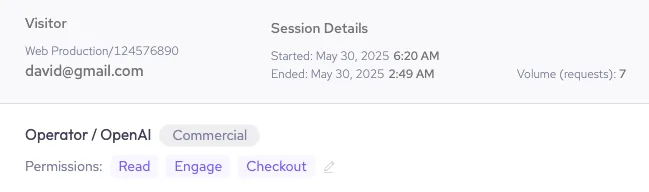
Next, you can review AgenticTrust’s AI-generated HUMAN Insights summarizing the outcome of the session, the most sensitive action the agent performed, and what actions they took during the session. This is useful for quickly assessing why the agent was blocked or allowed.
Finally, the Session Overview lists every session AgenticTrust has detected for the AI agent within the time range. This lets you track the agent’s activity across multiple sessions over time. The table has the following information:
- Timestamp: The date and time that AgenticTrust detected the session started.
- Rept.: The number of repetitions the AI agent performed for the corresponding path and category.
- Path: The path AgenticTrust detected the agent performed the action on.
- Category: The most sensitive activity type AgenticTrust detected the agent performed during the session. See Agentic activity priority for all possible activities and their priority.