For AI agents: a documentation index is available at the root level at /llms.txt and /llms-full.txt. Append /llms.txt to any URL for a page-level index, or .md for the markdown version of any page.
HUMAN DashboardHUMAN WebsiteRequest a Demo
Product GuidesEnforcer GuidesMobile SDKAPI ReferenceCustomer support
  • Getting Started
    • Overview
    • Best practices
  • Sightline Cyberfraud Defense
    • About Sightline Cyberfraud Defense
    • Getting Started
    • What's different in Sightline Cyberfraud Defense
    • Sensor changelog
    • About the Overview Dashboard
    • Glossary
  • AgenticTrust
    • Getting started with AgenticTrust
    • AI Agents Monitoring Dashboard
    • AI Visitors Overview Dashboard
    • Manage AI Agent Permissions
    • Agentic Activity Priority
    • Agent Trust Levels
  • Account Defender
    • Account Defender Overview
    • Use Cases
    • Prerequisites
    • Getting Started with Account Defender
    • Optimizing Account Defender Detection
    • Validating Account Defender Integration
    • Risk Triggers
    • About Network Events
    • Troubleshooting
  • Bot Defender
    • Bot Defender Overview
    • Detection
    • Bot Defender Policy Settings
    • Footprint
  • Credential Intelligence
    • Credential Intelligence Overview
    • How to Access the Breached Flag
    • Credential Intelligence FAQ
    • Credential Intelligence Dashboard
  • Code Defender
    • Code Defender Introduction
    • Getting Started with Code Defender
    • Code Defender Glossary
      • Overview
        • Integrations in the Console
        • Integrations via Customer Success or Support
        • Notifications and Alerts
        • Vendor Tagging
        • System Settings
    • Website Risk Analyzer
  • Platform
    • Account settings
    • Manage users
    • Role permissions
    • Enforcer configurations
    • Page Type Mapping
    • System Health
  • Client-Side Integration
    • JavaScript tag
    • Improving first page performance
    • Use of cookies & web storage
    • Advanced client integration
LogoLogo
Login
Login
HUMAN DashboardHUMAN WebsiteRequest a Demo
On this page
  • PagerDuty
  • Jira
  • Prerequisites
  • Make a request
Code DefenderPortalSettings

Integrations available only through Customer Success or Support

Was this page helpful?
Previous

Notifications and Alerts

Next
Built with

PagerDuty

Provide the following information:

  • Webhook URL
  • service_id - get your service id.
  • api_token - generate an API token.

Jira

You can contact our team for additional Jira integration functionality with the Jira integration in the console. After Support enables this feature for you, you will be able to update data fields in the tickets created by the Jira integration, and those updates will be reflected in the console.

This integration does not support the “Apply across the entire application” option.

Prerequisites

Make sure you enable the Jira integration in the console first.

Make a request

  1. From Jira Settings > Admin Panel > Webhooks, generate a new Secret and send it to us.
  2. After you receive an Account ID from us, return to the same webhook and update the following fields:
    • URL: https://api-gw.perimeterx.com/v1/jira/{your-account-id}
    • Issue related events text field: project = <your_project_id>
    • Issue: Select Updated
  3. In the Jira Project specified in Step 2, navigate to the Project settings > Issue types. In a Task-type issue, add the following custom fields:
    • PCI DSS Status: A dropdown field with the following options
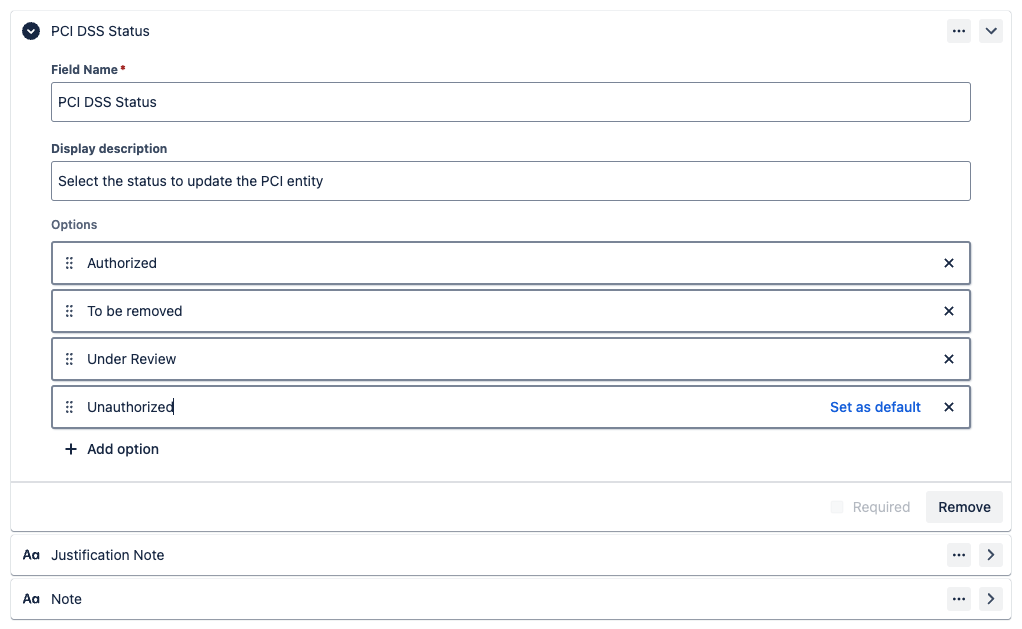
      • Authorized
      • To be removed
      • Under Review
      • Unauthorized
    • Justification Note: A short text field
    • Note: A short text field