

Inventory
The PCI DSS Inventory is a complete list of all auto-discovered scripts and headers, including their status, page, and other information. This is useful for viewing and identifying scripts and headers on your application from one place.
You can access the PCI DSS Inventory from Code Defender > PCI DSS Compliance > Inventory.
Script Inventory
The Script Authorization (6.4.3) tab has the Script Inventory of all scripts Code Defender discovered on the selection application and domain. The Inventory organizes scripts between Active and Archived ones. You can narrow down your results by searching for a specific script or using the provided filters  . You can also toggle the inventory view by Pages or Vendors.

Each entry in the Inventory can be clicked to expand it and display all the scripts associated with the page or vendor. You can click the more options  menu to take actions on an individual script. These include:
- Investigate script: Open and investigate the script from Code Defender’s Analyzer.
- Go to script source: View the script’s source JavaScript.
- Script summary details: Open the script summary view.
- Script authorization history: View the script’s authorization history.
- Change script status: Update the script’s status.
- Authorize: Authorize the script.
Alternatively, you can also click the checkbox next to multiple scripts to update them in bulk.

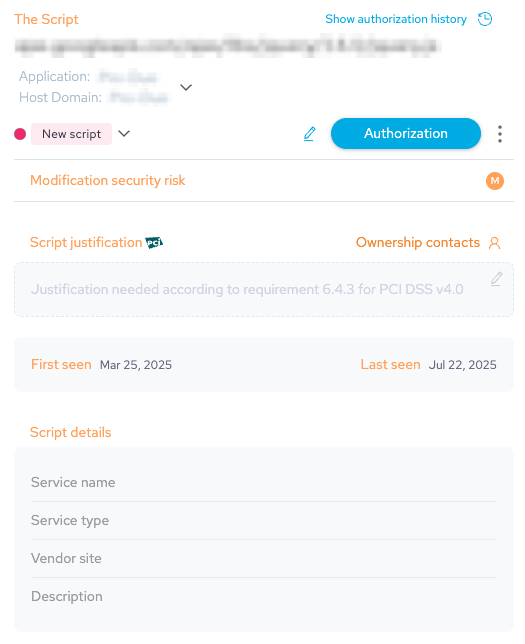
Click on a script directly to open its summary with detailed information about the script, update it status, edit its information, view its authorization history, and more. See the PCI DSS Dashboard documentation for more information.
Header Inventory
The HTTP Security Header Authorization (11.6.1) tab has the Header Inventory of all headers Code Defender discovered on the selection application and domain. The Inventory organizes headers between Active and Archived ones. You can narrow down your results by searching for a specific header or using the provided filters . You can also toggle the inventory view by Pages or Headers.

Each entry in the Inventory can be clicked to expand it and display all the headers associated with the page or pages associated with a header. You can click the more options menu to take actions on an individual header. These include:
- Header summary details: Open the header summary view.
- Header authorization history: View the header’s authorization history.
- Change header status: Update the header’s status.
- Authorize: Authorize the header.
Alternatively, you can also click the checkbox next to multiple headers to update them in bulk.

Click on a header directly to open its summary with detailed information about the header values, update it status, edit its information, view its authorization history, and more. See the PCI DSS Dashboard documentation for more information.
Content Security Policy (CSP) modifications
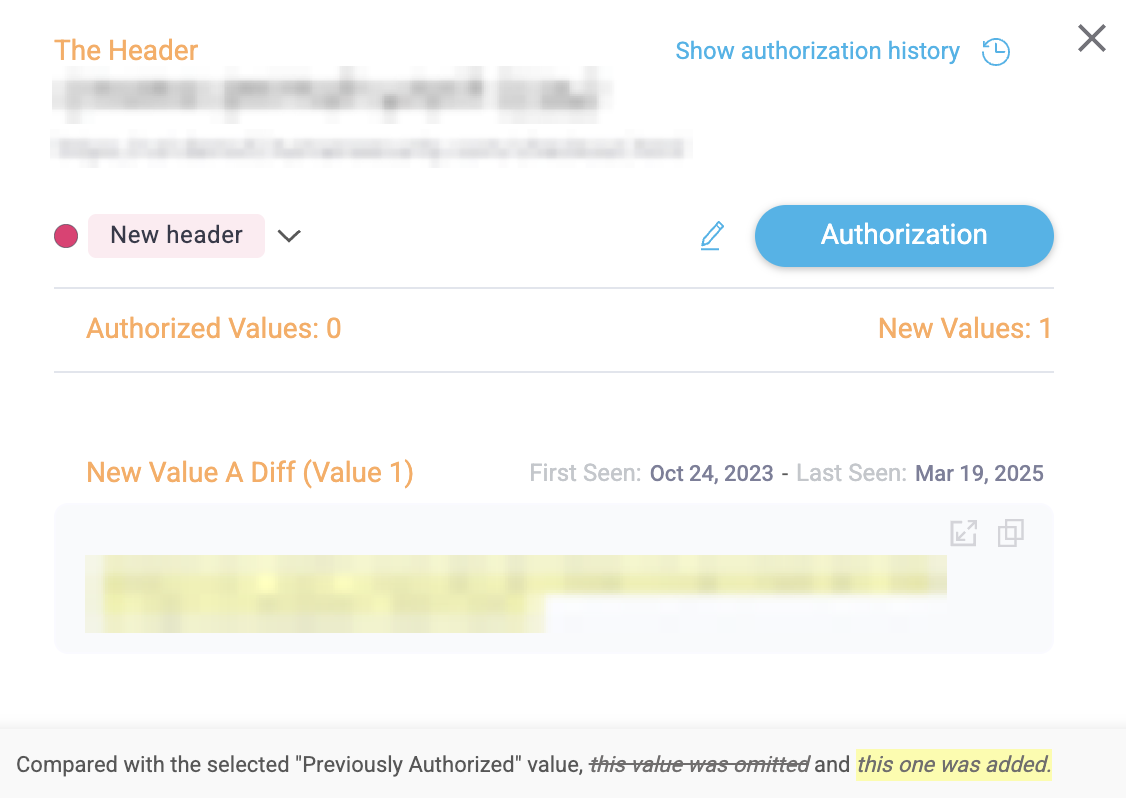
To review and manage Content Security Policy (CSP) modifications:
- Open the PCI DSS Header Authorization tab or header-modification incident and click View in Console (or the incident row from the PCI dashboard).
- Expand the panel for that
Content-Security-Policyheader to see exactly which directives or sources were added or removed. The UI shows the previous and current CSP values, with the changed parts highlighted (yellow). - Use the highlighted difference in the Console to decide whether to approve or investigate further.
Statuses
The Inventory uses various statuses to categorize scripts and headers. You can use these statuses to filter or search for specific scripts or headers as needed.
- Unauthorized: Scripts or headers that aren’t in the Authorized or Archived state.
- Unreviewed: Scripts or headers that Code Defender has recently detected, including new or modified ones, and have not yet been updated.
- New: The detected script or header value is new.
- Modified: The detected script or header value was previously detected and addressed, but has since changed and needs attention again.
- In progress: Scripts or header values that your team are currently addressing.
- Under review: The script or header value is undergoing review.
- To be removed: The script or header is marked for removal.
- Pending justification (script only): The script has been authorized, but still needs to be justified.
- Pending authorization (script only): The script has been justified, but still needs to be authorized.
- Unreviewed: Scripts or headers that Code Defender has recently detected, including new or modified ones, and have not yet been updated.
- Authorized: The script or header has been authorized.
- Archived: The script or header was archived, which means it is hidden from most views and excluded from inventory calculations. Scripts or headers that Code Defender has detected within the last 24 hours cannot be archived, and Code Defender automatically moves archived scripts or headers back to the active inventory if it detects them again.