For AI agents: a documentation index is available at the root level at /llms.txt and /llms-full.txt. Append /llms.txt to any URL for a page-level index, or .md for the markdown version of any page.
HUMAN DashboardHUMAN WebsiteRequest a Demo
Product GuidesEnforcer GuidesMobile SDKAPI ReferenceCustomer support
  • Getting Started
    • Overview
    • Best practices
  • Sightline Cyberfraud Defense
    • About Sightline Cyberfraud Defense
    • Getting Started
    • What's different in Sightline Cyberfraud Defense
    • Sensor changelog
    • About the Overview Dashboard
    • Glossary
  • AgenticTrust
    • Getting started with AgenticTrust
    • AI Agents Monitoring Dashboard
    • AI Visitors Overview Dashboard
    • Manage AI Agent Permissions
    • Agentic Activity Priority
    • Agent Trust Levels
  • Account Defender
    • Account Defender Overview
    • Use Cases
    • Prerequisites
    • Getting Started with Account Defender
    • Optimizing Account Defender Detection
    • Validating Account Defender Integration
    • Risk Triggers
    • About Network Events
    • Troubleshooting
  • Bot Defender
    • Bot Defender Overview
    • Detection
    • Bot Defender Policy Settings
    • Footprint
  • Credential Intelligence
    • Credential Intelligence Overview
    • How to Access the Breached Flag
    • Credential Intelligence FAQ
    • Credential Intelligence Dashboard
  • Code Defender
    • Code Defender Introduction
    • Getting Started with Code Defender
    • Code Defender Glossary
      • Overview
        • Integrations in the Console
        • Integrations via Customer Success or Support
        • Notifications and Alerts
        • Vendor Tagging
        • System Settings
    • Website Risk Analyzer
  • Platform
    • Account settings
    • Manage users
    • Role permissions
    • Enforcer configurations
    • Page Type Mapping
    • System Health
  • Client-Side Integration
    • JavaScript tag
    • Improving first page performance
    • Use of cookies & web storage
    • Advanced client integration
LogoLogo
Login
Login
HUMAN DashboardHUMAN WebsiteRequest a Demo
Code DefenderPortalSettings

Notifications and Alerts

Was this page helpful?
Previous

Vendor Tagging

Next
Built with

Alerts can be configured to trigger notifications about new incidents detected Code Defender to be sent to integrations.
Notifications are customizable per application/ host domain, and per incidents severity level.

To add new notifications, navigate to the Notifications & Alerts page (under Product Setting → Integrations).
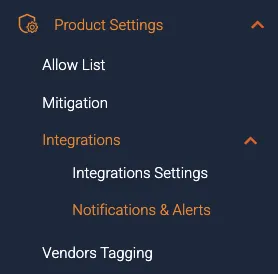
Click Add alert group and fill in the following details:

  1. Notifications group destination:
  • Integration type (Slack/ Email/ Jira/ Datadog/ OpsGenie)
  • Integration destination - the name of the integration to configure notifications for.

If you would like to send notifications to Microsoft Teams, we recommend working with your Teams admin and referencing this help article from Microsoft.

  1. Notifications source:
  • Applications - incidents for this application will trigger notifications to the chosen integration (All means all incidents of the account will be sent to the chosen integration).
  • Host domain - incidents for this host domain will trigger notifications to the chosen integration (All means all incidents of the application will be sent to the chosen integration).
  1. Incidents notifications:
  • Severity - incidents of the following risk levels will trigger notifications to the chosen integration (The default severity is High incidents only, as it is our recommendation).
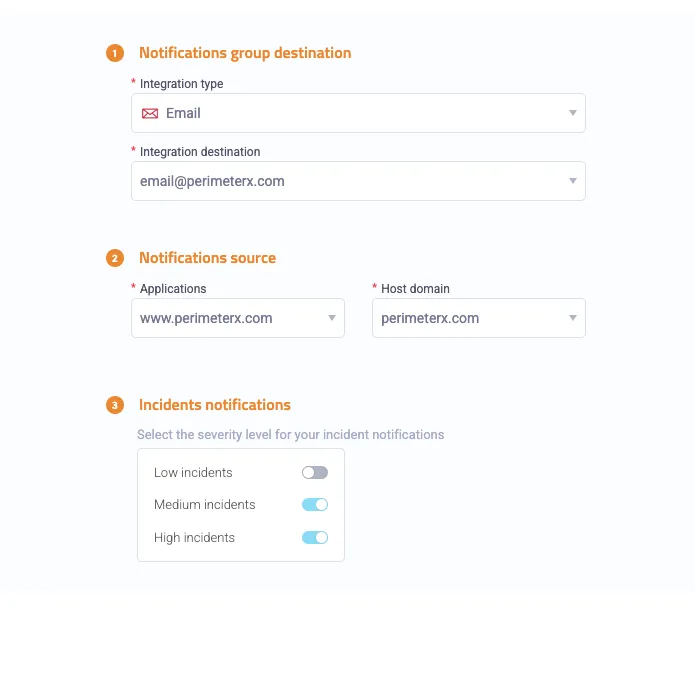
    notifications_settings
  • To edit or delete an existing notifications group, click the group and select Open&Edit.

    open edit delete
  • To change settings, click the integration row and select Open integration settings.
