

Page Intelligence Dashboard
Page Intelligence is HUMAN’s on page advertising solution for flagging invalid pageviews.
Page Intelligence’s Executive Summary provides an overview of your landing page activity and performance in near-real time. In addition to the standard Executive Summary functionality shared across all HUMAN products, this page offers several elements specific to Page Intelligence.
Filters
You can use filters to customize the data displayed on the Page Intelligence Executive Summary page. These filters include:
- Current Period: The time period for which traffic data will be displayed.
- Comparison Period: The time period to which current traffic data will be compared (as percentage-over-time trends).
- Is Paid Traffic (Yes / No): Ability to filter data by the traffic type–paid or organic
- Traffic Type: Ability to filter data by Valid/SIVT/GIVT traffic
For the Current Period filter, the is in the last constraint calculates time periods using calendar benchmarks rather than counting backwards from the date and time at which the filter is created.
For example, if you create a filter to show data within the past month, you’ll see data starting from the first day of the current calendar month rather than data from the past 30 days. As a result, you may see empty data for the remaining part of the month that has yet to occur. The same time period logic applies to days (which start at midnight), weeks (which start on Monday), and years (which start on January 1st).
To create week or month filters that count backwards from the current date and time, you can create a filter for is in the last <7 days> or is in the last <30 days> instead.
After you’ve adjusted these filters, select  to update your Page Intelligence data.
Traffic overview
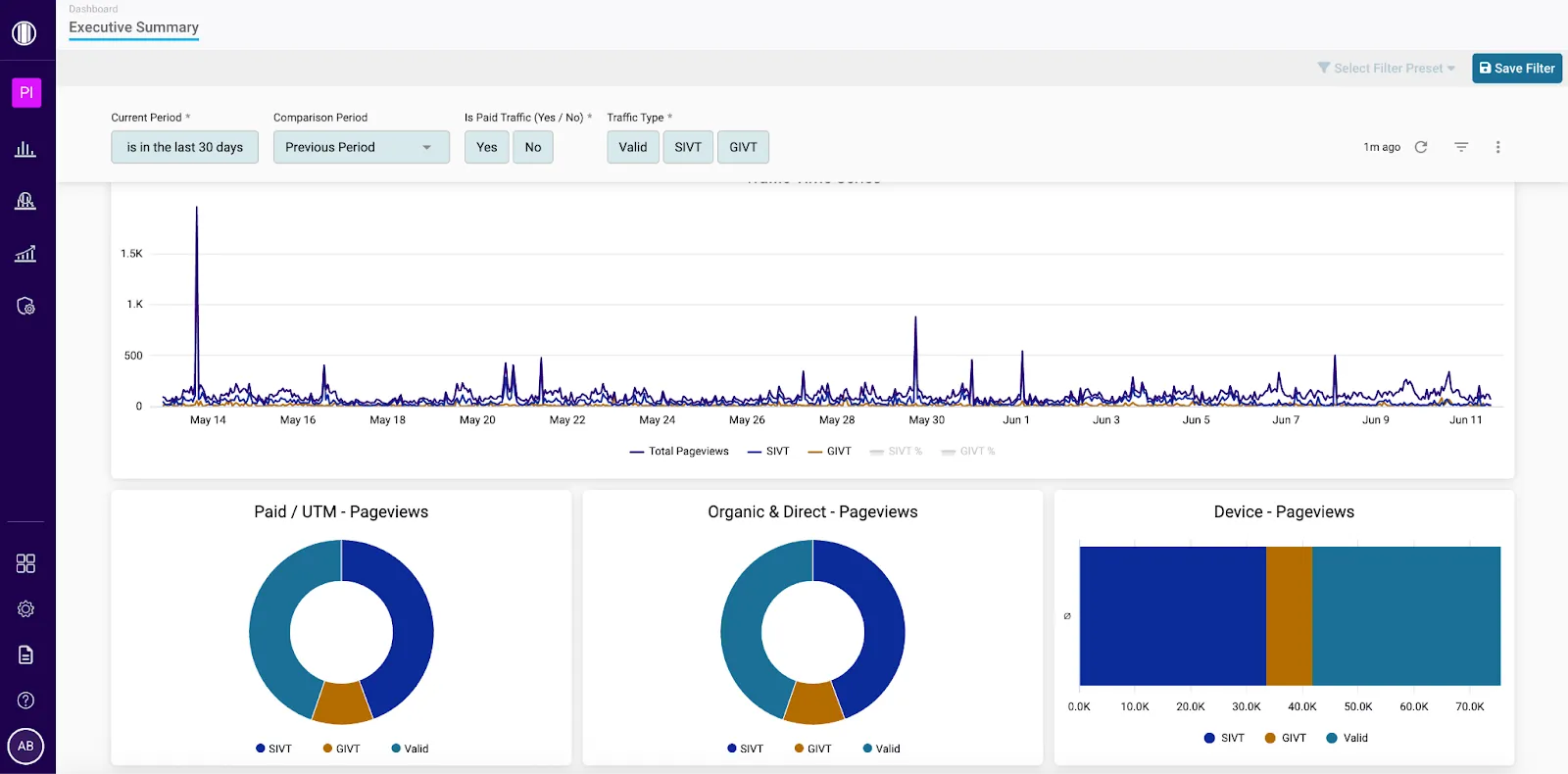
Page Intelligence’s Executive Summary page includes multiple breakdowns of the traffic data that meets the conditions of your applied filters.
Traffic metrics
A traffic breakdown by pageview category. These breakdowns include pageview percentages, pageview totals, and percentage trends over time.
- Total Pageviews: The total number of recorded pageviews during the selected time frame.
- Valid Pageviews: The percentage and number of pageviews that were determined to be valid.
- IVT Pageviews: The percentage and number of pageviews that HUMAN flagged as Invalid Traffic (IVT). This percentage is the combined total of Sophisticated IVT (SIVT) and General IVT (GIVT) pageviews.
- SIVT Pageviews: The percentage and number of pageviews that HUMAN flagged as Sophisticated IVT (SIVT).
- GIVT Pageviews: The percentage and number of pageviews that HUMAN flagged as General IVT (GIVT).
Any increase in the percentage of Valid Pageviews is highlighted in green, since this positively impacts the quality of your overall traffic. Any increase in the percentage of IVT, SIVT, or GIVT Pageviews is highlighted in red, since this negatively impacts the quality of your overall traffic.
Traffic Time Series
A graph that displays the total number of pageviews over time, as well as the number of these pageviews that were classified as SIVT and GIVT. You can hover over any point on the graph to view the timestamp and number of pageviews associated with that data point, or select any labels below the graph to show/hide that category’s data in the visualization.
IVT Category - Pageviews
A chart that displays the IVT categories detected by HUMAN, broken down by the number of invalid pageviews per category that occurred on each page.
You can hover over any section of the chart to view the number of pageviews associated with that page and IVT category, or select any of the labels below the graph to show/hide that IVT category’s data in the visualization.
Paid / UTM - Pageviews
Pageviews breakdown by paid sources (those having UTM tags in them)
Organic & Direct - Pageviews
Pageviews breakdown by non-paid or direct or organic sources (those who DON’T have UTM tags in them)
Device - Pageviews
Pageviews breakdown by device types
UTM Campaign / Source / Medium / Term / Content
UTM tags (also called UTM parameters) are short text codes added to the end of a URL to help track the performance of online marketing campaigns.
- UTM Campaign: A tag used to identify the specific marketing campaign (e.g., spring_sale, newsletter_march) that is driving traffic to your website. Helps track the performance of that campaign.
- UTM Source: Identifies where the traffic is coming from (e.g., google, facebook, newsletter). It tells you the origin of the click.
- UTM Medium: Describes how the traffic is coming to you (e.g., cpc, email, social, referral). It reflects the marketing channel used.
- UTM_Term (optional): Tracks keywords for paid search campaigns.
- UTM_Content (optional): Differentiates similar content or links within the same ad (e.g., banner1, textlink).